

Offline Cards and Custom Dashboards
Avni allows you to create different indicator reports that are available offline to the field users. These reports help field users to derive more insights on the captured data.
Creating an offline report is a two-step process. First, we need to create a report card that holds the actual query function. Second, we group multiple cards into to a dashboard.
Creating a Card
Creating a new card is no different than creating any other Avni entity. Open app designer and go to the Card tab. Click on the new card and provide the details like name, description, etc.
Card Types
Cards can be of 4 types:
- Standard Report Card — Built-in logic for common use cases (scheduled visits, overdue, approvals, etc.)
- Custom Data Card — A query-based card with configurable actions (view subject profile, do visit, or mark attendance)
- Nested Report Card — A single query that renders up to 9 sub-cards
- Custom Design Card — A fully custom card rendered using an uploaded HTML template with dynamic data
1. Standard Report Cards
The logic used to display the values in standard cards is already implemented in Avni. The different types are (Entity specified in brackets indicates the type of entity listed on clicking on the card):
-
Pending approval (Entity Approval Statuses)
-
Approved (Entity Approval Statuses)
-
Rejected (Entity Approval Statuses)
-
Scheduled visits (Subjects)
-
Overdue visits (Subjects)
-
Recent registrations (Subjects)
-
Recent enrolments (Subjects)
-
Recent visits (Subjects)
-
Total (Subjects)
-
Comments (Subjects)
-
Call tasks (Tasks)
-
Open subject tasks (Tasks)
-
Due checklist (Individuals)
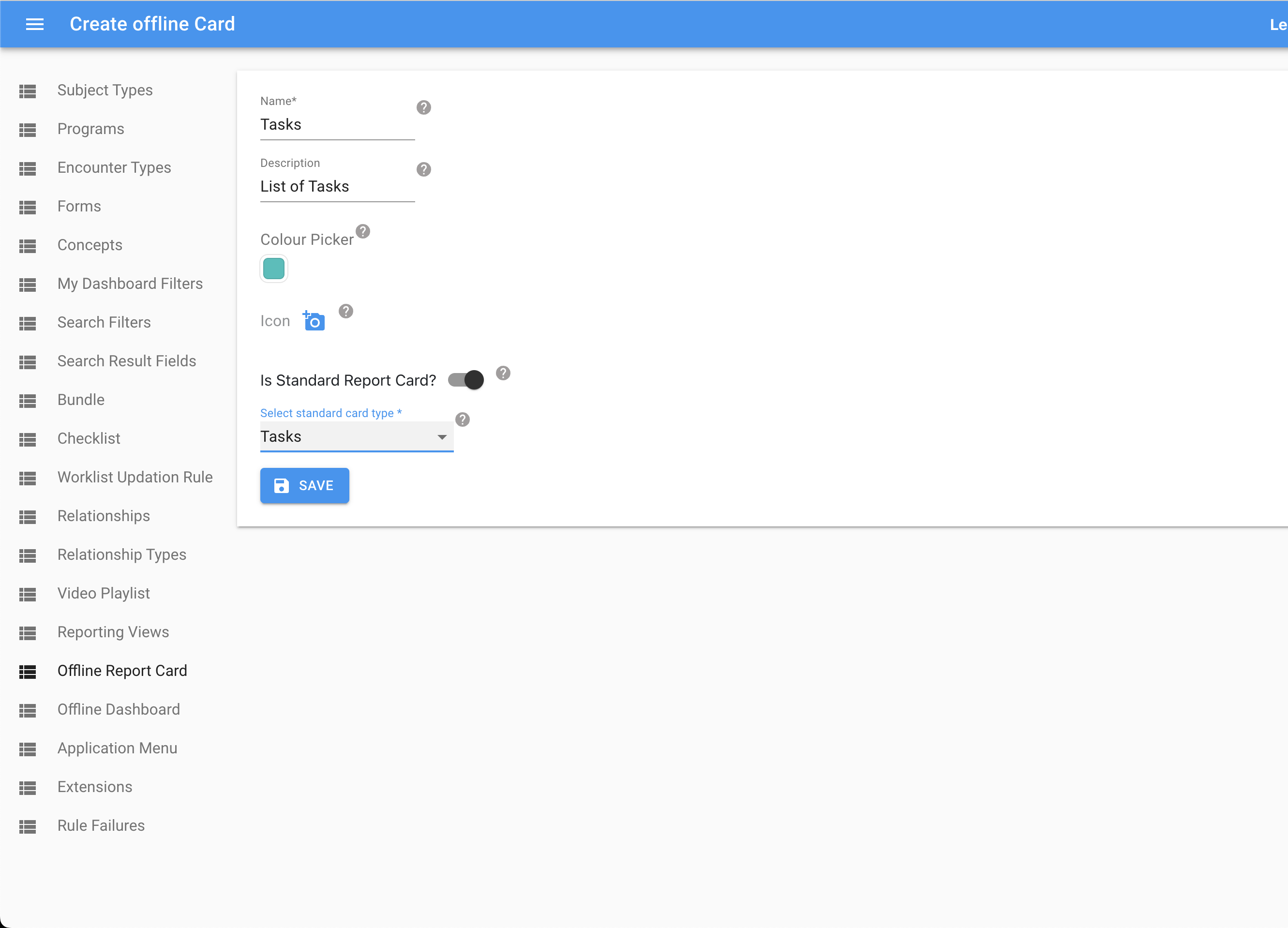
Standard Report Card Type Filters
Filters can be added at the report card level for certain standard report types. The following filters are supported:
- Subject Type
- Program
- Encounter Type
- Recent Duration
Subject Type, Program and Encounter Type filters are supported for 'Overdue Visits', 'Scheduled Visits', 'Total' and 'Recent' types ('Recent registrations', 'Recent enrolments', 'Recent visits').
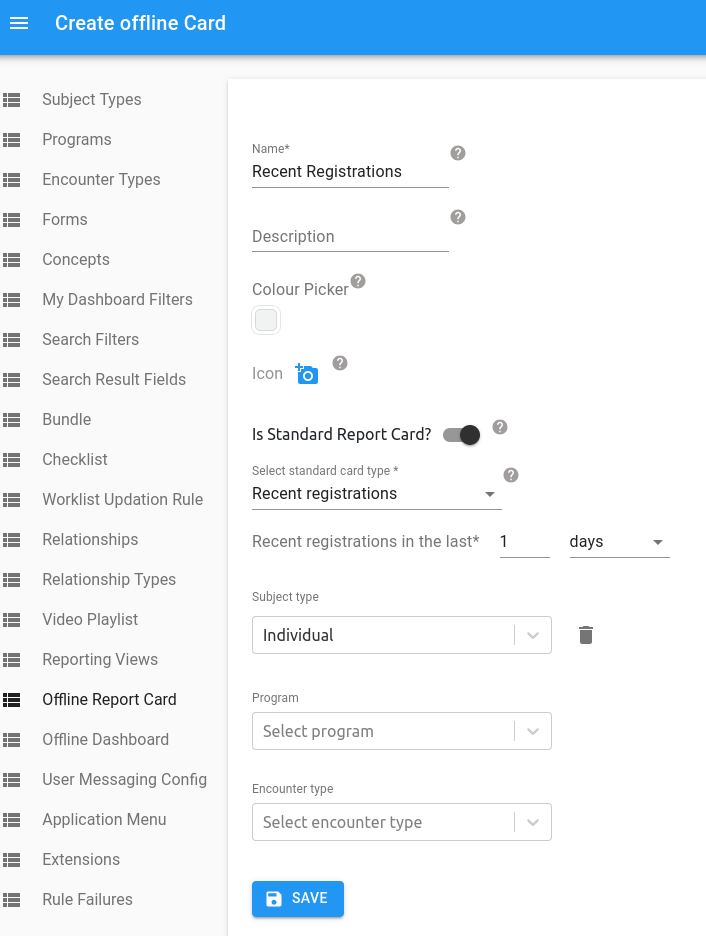
Filters can also be configured at the dashboard level (covered below). If a filter is configured both at the report card level and the dashboard level, the filter at the report card level is applied first. Hence, mixing of the same type of filter at both levels should be avoided as it could lead to the unintuitive behaviour of the field user selecting a value, say 'Household' for the subject type filter at the dashboard level but still seeing the numbers for the 'Individual' subject type which is configured at the report card level.
2. Custom Data Cards
Custom data cards are query-based cards where the implementer writes the logic. They support configurable actions that determine what happens when a user taps the card on the mobile app.
Action Configuration
When creating a custom data card (with "Is Standard Report Card?" disabled), an Action dropdown appears with three options:
- View subject profile (default) — Opens the subject's profile on tap
- Do visit — Opens an encounter form on tap
- Mark attendance — Opens the attendance sheet for a class, pre-selected to one attendance type for today (requires the Attendance feature)
View Subject Profile (Default Action)
This is the default action. The card runs your query and displays the result on the dashboard tile.
Behavior:
- Multiple subjects returned: Shows the list of subjects. The custom card name appears in the top bar.
- Single subject returned: Directly opens the subject's profile — no listing screen shown.
- No subjects returned: Card shows count as 0.
The query can return a simple array of subjects:
'use strict';
({params, imports}) => {
    return params.db.objects('Individual')
        .filtered("voided == false AND subjectType.name = 'MySubjectType'");
};
Or return an object with additional display properties:
'use strict';
({params, imports}) => {
    const individuals = [...params.db.objects('Individual')
        .filtered("voided == false AND subjectType.name = 'MySubjectType'")];
    return {
        primaryValue: individuals.length,
        secondaryValue: '(active)',
        cardColor: '#123456',
        textColor: '#ffffff',
        cardName: 'Dynamic Card Name',
        lineListFunction: () => individuals
    };
};
Query Return Properties:
| Property | Required | Description |
|---|---|---|
primaryValue | Yes | The main value displayed on the card (typically a count or percentage) |
secondaryValue | No | Additional text displayed below the primary value |
cardColor | No | Background color of the card tile (hex). Overrides the color set in the admin UI |
textColor | No | Text color on the card tile (hex). Overrides default |
cardName | No | Display name on the card tile and list header. Overrides the card name set in the admin UI |
lineListFunction | No | A function that returns the list of subjects. If provided, the card becomes tappable. If not provided, the card displays the value but is not tappable |
Backward Compatibility: All existing custom card queries continue to work. Queries returning a plain array of subjects, or only primaryValue and lineListFunction, or primaryValue without lineListFunction (e.g., percentage cards) all work as before.
Example: Percentage Card (Non-tappable because lineListFunction is not a function)
'use strict';
({params, imports}) => {
    const total = params.db.objects('Individual').filtered('voided = false').length;
    const enrolled = params.db.objects('Individual')
        .filtered("voided = false AND SUBQUERY(enrolments, $e, $e.voided = false AND $e.program.name = 'MyProgram').@count > 0").length;
    const percentage = total > 0 ? ((enrolled / total) * 100).toFixed(1) : 0;
    return {primaryValue: percentage + '%', lineListFunction: 'n/a'};
};
Do Visit Action
This action is for cards where tapping should directly open an encounter form. When Do visit is selected, additional configuration fields appear:
| Field | Required | Description |
|---|---|---|
| Subject Type | Yes | The subject type this card applies to |
| Program | No | The program (for program encounters). Leave empty for general encounters |
| Encounter Type | Yes | The encounter form to open |
| Visit Type | Yes | Scheduled — opens an existing scheduled visit. Unplanned — creates and opens a new visit |
Scheduled Visit Type:
- On tap, only subjects with a scheduled encounter of the configured type are shown.
- The encounter type name appears below each subject in the list. Clicking it opens the scheduled visit form directly.
- Single matching subject: opens the form directly — no listing shown.
- No matching subjects: card dismisses without navigation.
Unplanned Visit Type:
- On tap, only subjects enrolled in the configured program (if set) are shown.
- The encounter type name appears below each subject. Clicking it opens a new visit form.
- Single matching subject: opens the new form directly — no listing shown.
For Do visit cards, the count shown on the card tile is the filtered count (subjects with eligible encounters), not the primaryValue from the query. This ensures the tile always reflects how many subjects the user will actually see on tap.
Example: Scheduled Program Encounter
Admin configuration: Action = Do visit, Subject Type = Patient, Program = Maternal Health, Encounter Type = ANC Visit, Visit Type = Scheduled
'use strict';
({params, imports}) => {
    const individuals = [...params.db.objects('Individual')
        .filtered("voided == false AND subjectType.name = 'Patient'")];
    return {
        primaryValue: individuals.length,
        cardName: 'ANC Visits Due',
        cardColor: '#e65100',
        lineListFunction: () => individuals
    };
};
Example: Unplanned General Encounter
Admin configuration: Action = Do visit, Subject Type = Household, Program = (empty), Encounter Type = Survey, Visit Type = Unplanned
'use strict';
({params, imports}) => {
    const individuals = [...params.db.objects('Individual')
        .filtered("voided == false AND subjectType.name = 'Household'")];
    return {
        primaryValue: individuals.length,
        cardName: 'Surveys to Fill',
        lineListFunction: () => individuals
    };
};
Mark Attendance Action
This action turns a card into a daily attendance worklist for one attendance type. It is built for organisations that run several named attendances a day (for example Morning Prayer / Math Class / Afternoon Reading) across many classes and need a "what's still unmarked today" nudge. Tapping a class on the card jumps the field worker straight into the attendance sheet for that class and attendance type, for today — instead of opening the class dashboard — and on save returns them to the card with one fewer class pending.
Prerequisite: the Attendance feature. The chosen Group Subject Type must already have attendance enabled with at least one fully configured attendance type. Configure one card per attendance type (a card targets a single attendance type).
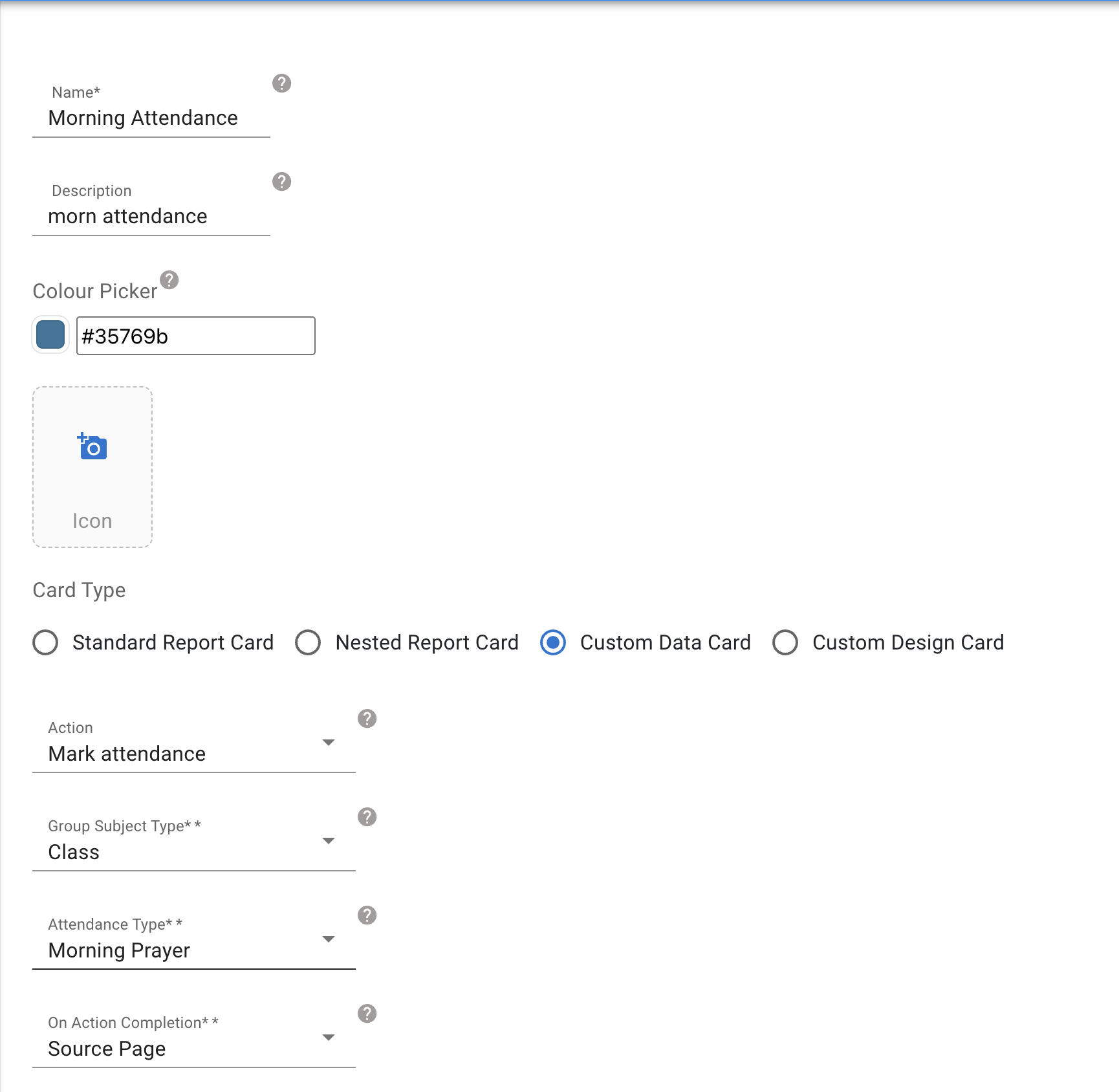
When Mark attendance is selected, these configuration fields appear:
| Field | Required | Description |
|---|---|---|
| Group Subject Type | Yes | Only Group subject types that have attendance enabled are listed |
| Attendance Type | Yes | The attendance types configured on the chosen Group Subject Type. Changing the Group Subject Type resets this picker. If the subject type has none, a hint points you to App Designer → Subject Types → Attendance |
| On Action Completion | Yes | Source Page (default) — after saving, return to the card list (count decremented). Subject Profile Page — after saving, land on the class dashboard |
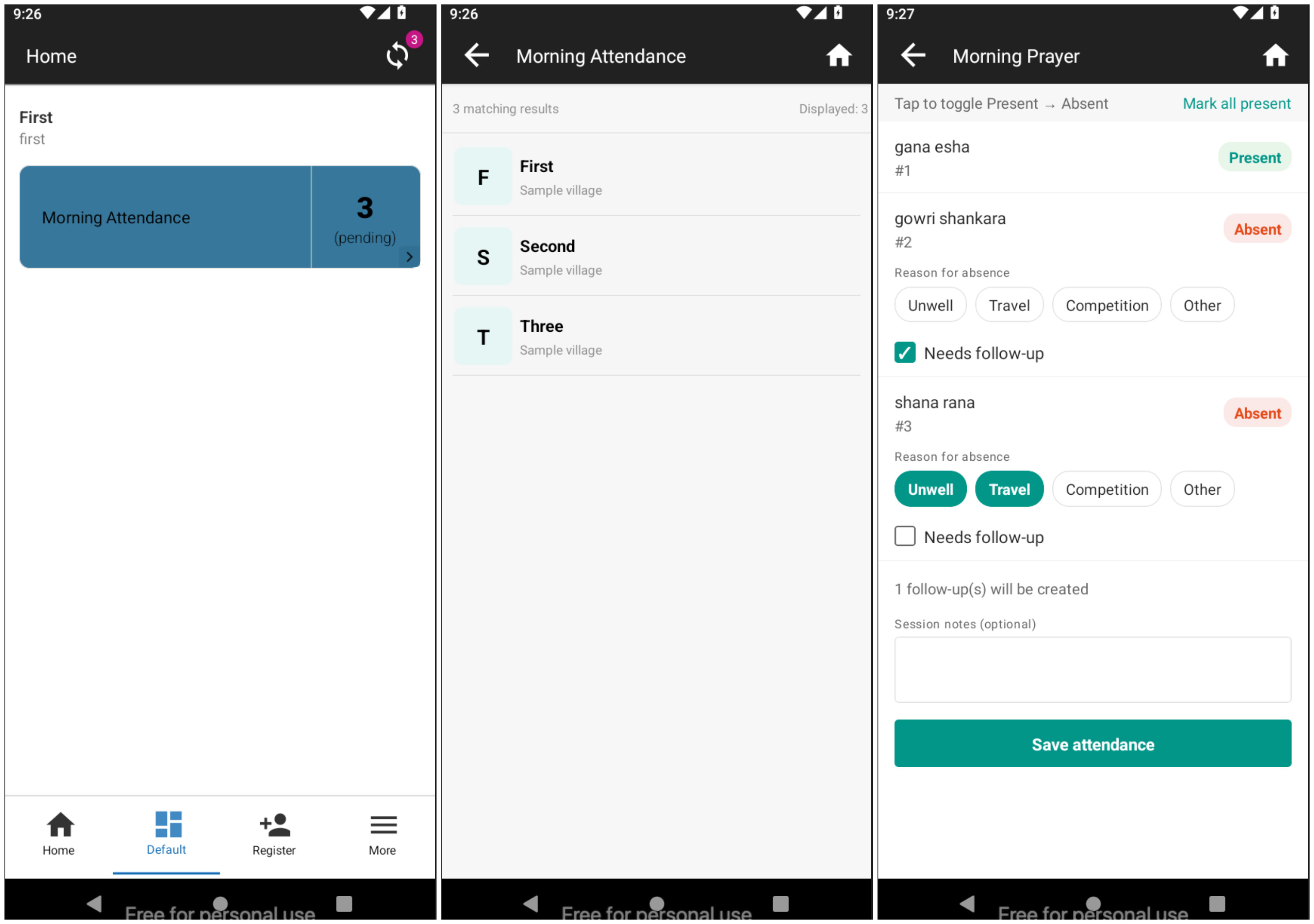
Behaviour on the field app (Android):
- The card tile reads e.g. "Morning Prayer — 4 pending". The count and the listed classes come entirely from the card's query (see the sample below) evaluated on-device — the server computes nothing.
- Tapping the card opens the usual subject listing of the classes the query returned.
- Tapping a class opens the attendance sheet pre-selected to that attendance type for today — the same roster, inline absence-reason and save sheet as the per-class flow. The date strip stays available, so a past date can still be corrected from there.
- On save, On Action Completion decides where the worker lands — back on the card list (one fewer pending) or on the class dashboard.
Platform note: the deep-link is Android only for now. A Mark-attendance card still renders on the webapp's Data Entry App dashboards and lists the classes, but a row tap there opens the subject dashboard (today's behaviour) rather than the attendance sheet.
Sample "unmarked today" query. Use this as a starting point and adapt the filters to your organisation. It returns the classes that are still missing this attendance type's session for today; the card count is the length of that list. The query does not receive the card's configured Group Subject Type / Attendance Type — set them yourself at the top of the query (by UUID below, or resolve them by name). Since each card targets one attendance type, give each card its own copy with the right values.
'use strict';
({params, imports}) => {
    const db = params.db;
    const moment = imports.moment;

    // Session.scheduledDate is stored as a calendar-date string ("YYYY-MM-DD"),
    // so compare against today's date as a string, not a JS Date.
    const todayStr = moment().format('YYYY-MM-DD');

    // Set these to match this card's Group Subject Type and Attendance Type
    // (the query has no access to the card config). Use UUIDs, or resolve by name.
    const subjectTypeUUID    = "<your-group-subject-type-uuid>";
    const attendanceTypeUUID = "<your-attendance-type-uuid>";

    // 1. Classes of the configured Group Subject Type in the user's catchment.
    const classes = [...db.objects('Individual')
        .filtered("voided == false AND subjectType.uuid == $0", subjectTypeUUID)];

    // 2. Keep only classes that do NOT yet have a (non-voided) Session for
    //    (this class, today, this attendance type).
    const unmarked = classes.filter((cls) => {
        const session = db.objects('Session').filtered(
            "voided == false AND scheduledDate == $0 AND attendanceTypeUUID == $1 AND groupSubjectUUID == $2",
            todayStr, attendanceTypeUUID, cls.uuid
        );
        return session.length === 0;
    });

    // Optional: also drop classes whose resolved calendar makes today a
    //           non-working day, so the worklist only shows expected sessions.

    return {
        primaryValue: unmarked.length,
        secondaryValue: 'pending',
        lineListFunction: () => unmarked
    };
};
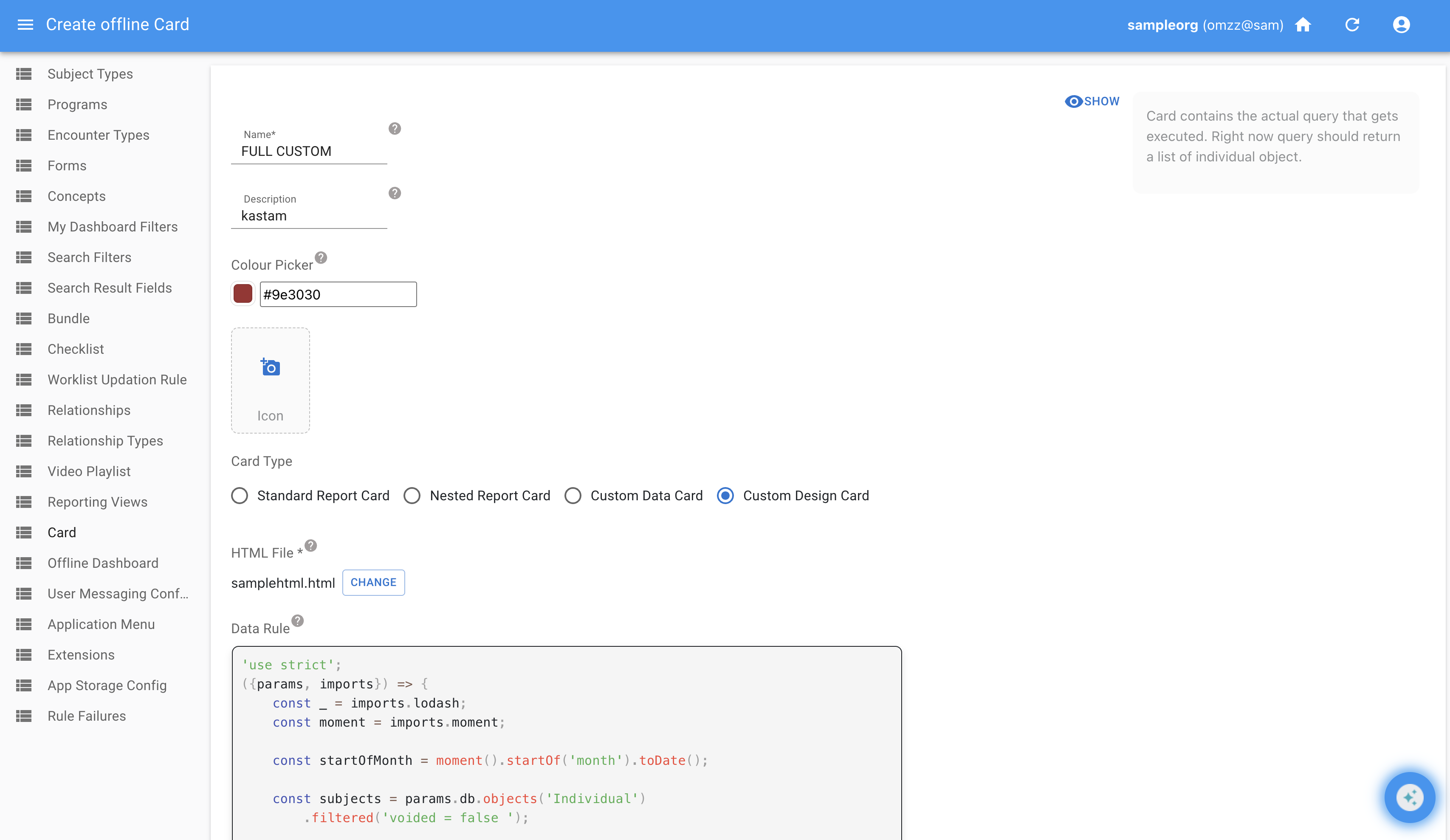
3. Custom Design Cards
Custom design cards allow implementers to upload an HTML file as the display template for a fully custom card. This enables org-specific layouts (tables, styling, sections) without being constrained by the fixed Avni card UI.
Configuration:
- Select Custom Design Card as the card type
- Data Rule (optional): A JS rule that returns dynamic data for the HTML template. Input/output follows the same pattern as other card rules — dashboard filters are passed as input, and the rule returns a
dataobject whose keys are reachable in the HTML asdata.variableName. IfprimaryValue/secondaryValueare returned, they show on the card tile. Ifnameorcolorsare returned, they override the tile's name and colours. - HTML File (required): Upload an HTML file defining the custom layout. Saving without an HTML file shows a validation error. Saving without a data rule is allowed.
- Translations (optional): Key and English value pairs the HTML template can reference as
${translations.KEY}. See Translations below.
Sample Data Rule and HTML
This sample is English only. Its labels, its empty-table message and its status pills are typed straight into the HTML and the script, so they stay English in every language. To translate a card like this, follow Translations under Custom Design Cards further down. Text the card's script writes needs the steps under "Text the card's script writes".
'use strict';
({params, imports}) => {
    const _ = imports.lodash;
    const moment = imports.moment;

    const startOfMonth = moment().startOf('month').toDate();

    const subjects = params.db.objects('Individual')
        .filtered('voided = false ');

    const rows = _.map(subjects, ind => {
        const enrolment = _.first(ind.enrolments);
        const lastEncounter = enrolment
            ? _.maxBy(enrolment.encounters, e => e.encounterDateTime)
            : _.maxBy(ind.encounters, e => e.encounterDateTime);
        return {
            date: moment(ind.registrationDate).format('DD.MM.YY'),
            name: ind.name,
            status: 'approved',
            village: ind.lowestAddressLevel ? ind.lowestAddressLevel.name : null,
            program: enrolment ? enrolment.program.name : null,
            lastVisit: lastEncounter && lastEncounter.encounterDateTime
                ? moment(lastEncounter.encounterDateTime).format('DD.MM.YY')
                : null,
            amount: null,
        };
    });

    return {
        primaryValue: rows.length,
        secondaryValue: `(${rows.length} this month)`,
        name: 'Recent Registrations',
        colors: { background: '#FFE500', text: '#222222' },

        data: {
            total: rows.length,
            rows: rows,
        },
    };
}
<style>
    * { box-sizing: border-box; margin: 0; padding: 0; }
    body { font-family: sans-serif; background: #f5f5f5; }

    .summary {
      background: white;
      border: 2px solid #333;
      border-radius: 6px;
      padding: 14px;
      text-align: center;
      margin-bottom: 12px;
    }
    .summary .label { font-size: 12px; color: #666; margin-bottom: 4px; }
    .summary .value { font-size: 22px; font-weight: 700; color: #222; }

    .filter-bar {
      display: flex;
      align-items: center;
      gap: 8px;
      margin-bottom: 12px;
      padding: 10px;
      background: white;
      border: 1px solid #ccc;
      border-radius: 6px;
    }
    .filter-bar label { font-size: 13px; font-weight: 600; color: #333; }
    .filter-bar select {
      padding: 6px 10px;
      font-size: 13px;
      border: 1px solid #999;
      border-radius: 4px;
      background: white;
    }

    .table-wrapper { overflow-x: auto; -webkit-overflow-scrolling: touch; }
    table { width: 100%; border-collapse: collapse; border: 2px solid #333; background: white; }
    th { background: #fff3cd; font-weight: 700; padding: 8px; border: 1px solid #333; font-size: 13px; text-align: left; }
    td { padding: 8px; border: 1px solid #333; font-size: 13px; }

    .status-pill {
      display: inline-block;
      padding: 2px 8px;
      border-radius: 10px;
      font-size: 11px;
      font-weight: 600;
    }
    .status-approved { background: #d4edda; color: #155724; }
    .status-pending  { background: #fff3cd; color: #856404; }
    .status-rejected { background: #f8d7da; color: #721c24; }

    .empty {
      background: white;
      border: 2px dashed #999;
      padding: 20px;
      text-align: center;
      color: #777;
      border-radius: 6px;
    }
    #filtered-count { font-size: 13px; color: #666; margin-left: auto; }
  </style>

  <div class="summary">
    <div class="label">Total registrations</div>
    <div class="value" id="total-display">${data.total}</div>
  </div>

  <div class="filter-bar">
    <label for="month-filter">Month:</label>
    <select id="month-filter" onchange="filterByMonth()">
      <option value="all">All months</option>
    </select>
    <span id="filtered-count"></span>
  </div>

  <div class="table-wrapper">
    <table>
      <thead>
        <tr>
          <th>Date</th>
          <th>Subject</th>
          <th>Status</th>
          <th style="text-align:right;">Amount</th>
        </tr>
      </thead>
      <tbody id="table-body">
      </tbody>
    </table>
  </div>

  <script>
    var allRows = ${JSON.stringify(data.rows)};

    function getMonthYear(dateStr) {
      var parts = dateStr.split('.');
      return parts[1] + '.' + parts[2];
    }

    function getMonthLabel(monthYear) {
      var months = ['', 'Jan', 'Feb', 'Mar', 'Apr', 'May', 'Jun',
                    'Jul', 'Aug', 'Sep', 'Oct', 'Nov', 'Dec'];
      var parts = monthYear.split('.');
      var monthNum = parseInt(parts[0], 10);
      return months[monthNum] + ' 20' + parts[1];
    }

    function populateMonthFilter() {
      var select = document.getElementById('month-filter');
      var monthSet = {};
      allRows.forEach(function(row) {
        var my = getMonthYear(row.date);
        monthSet[my] = true;
      });
      var sorted = Object.keys(monthSet).sort().reverse();
      sorted.forEach(function(my) {
        var opt = document.createElement('option');
        opt.value = my;
        opt.textContent = getMonthLabel(my);
        select.appendChild(opt);
      });
    }

    function renderRows(rows) {
      var tbody = document.getElementById('table-body');
      if (rows.length === 0) {
        tbody.innerHTML = '<tr><td colspan="4" style="text-align:center;color:#777;">No data for selected month</td></tr>';
      } else {
        tbody.innerHTML = rows.map(function(row) {
          return '<tr>'
            + '<td>' + row.date + '</td>'
            + '<td>' + row.name + '</td>'
            + '<td><span class="status-pill status-' + row.status + '">' + row.status + '</span></td>'
            + '<td style="text-align:right;">' + (row.amount != null ? row.amount : '-') + '</td>'
            + '</tr>';
        }).join('');
      }
      document.getElementById('total-display').textContent = rows.length;
      document.getElementById('filtered-count').textContent = rows.length + ' of ' + allRows.length;
    }

    function filterByMonth() {
      var selected = document.getElementById('month-filter').value;
      if (selected === 'all') {
        renderRows(allRows);
      } else {
        renderRows(allRows.filter(function(row) {
          return getMonthYear(row.date) === selected;
        }));
      }
    }

    populateMonthFilter();
    renderRows(allRows);
  </script>
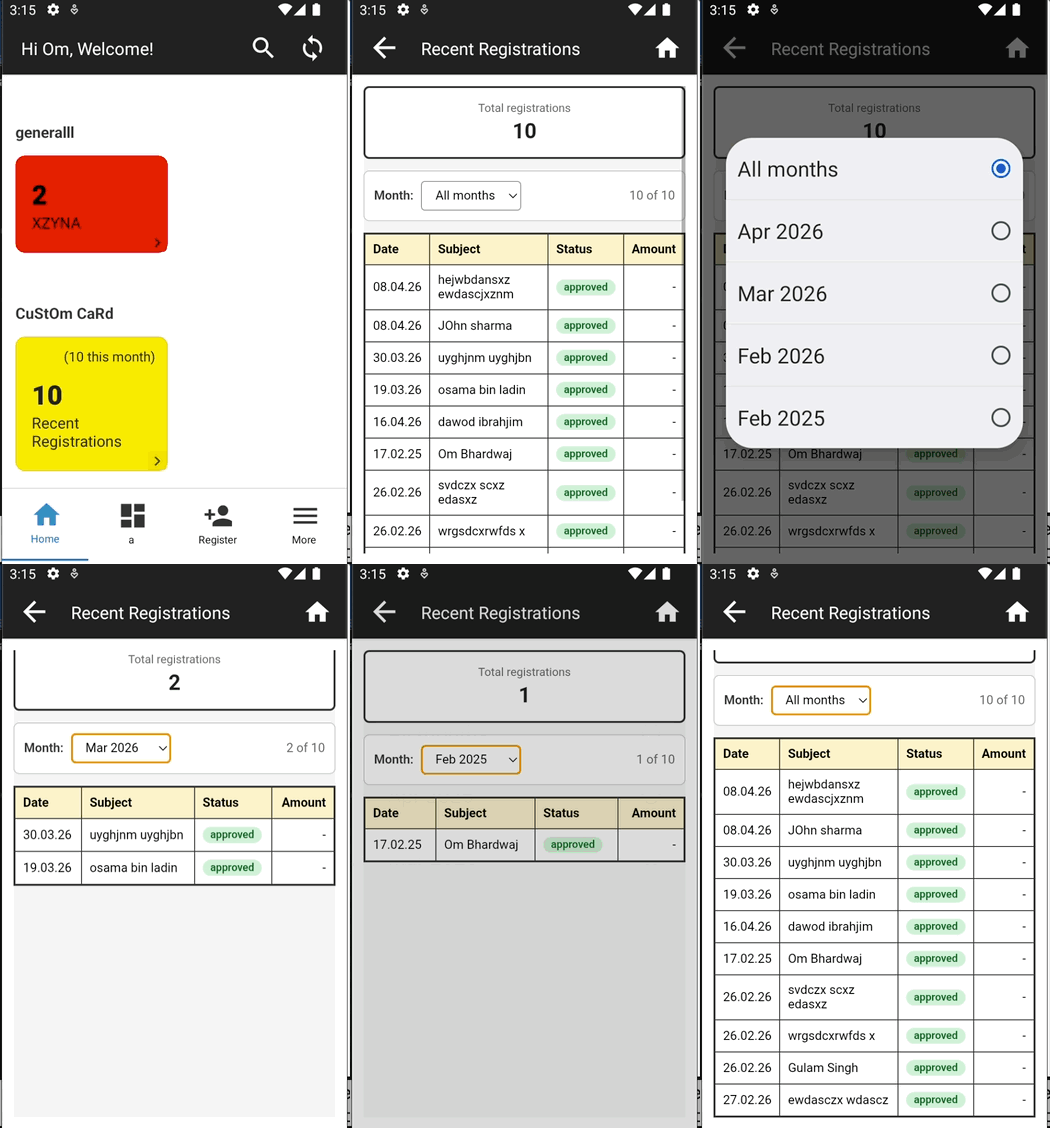
In the mobile app, the HTML template is rendered with data from the rule. The HTML is wrapped as a template literal and data is passed to generate the final HTML string, rendered within a WebView.
Creating a Dashboard
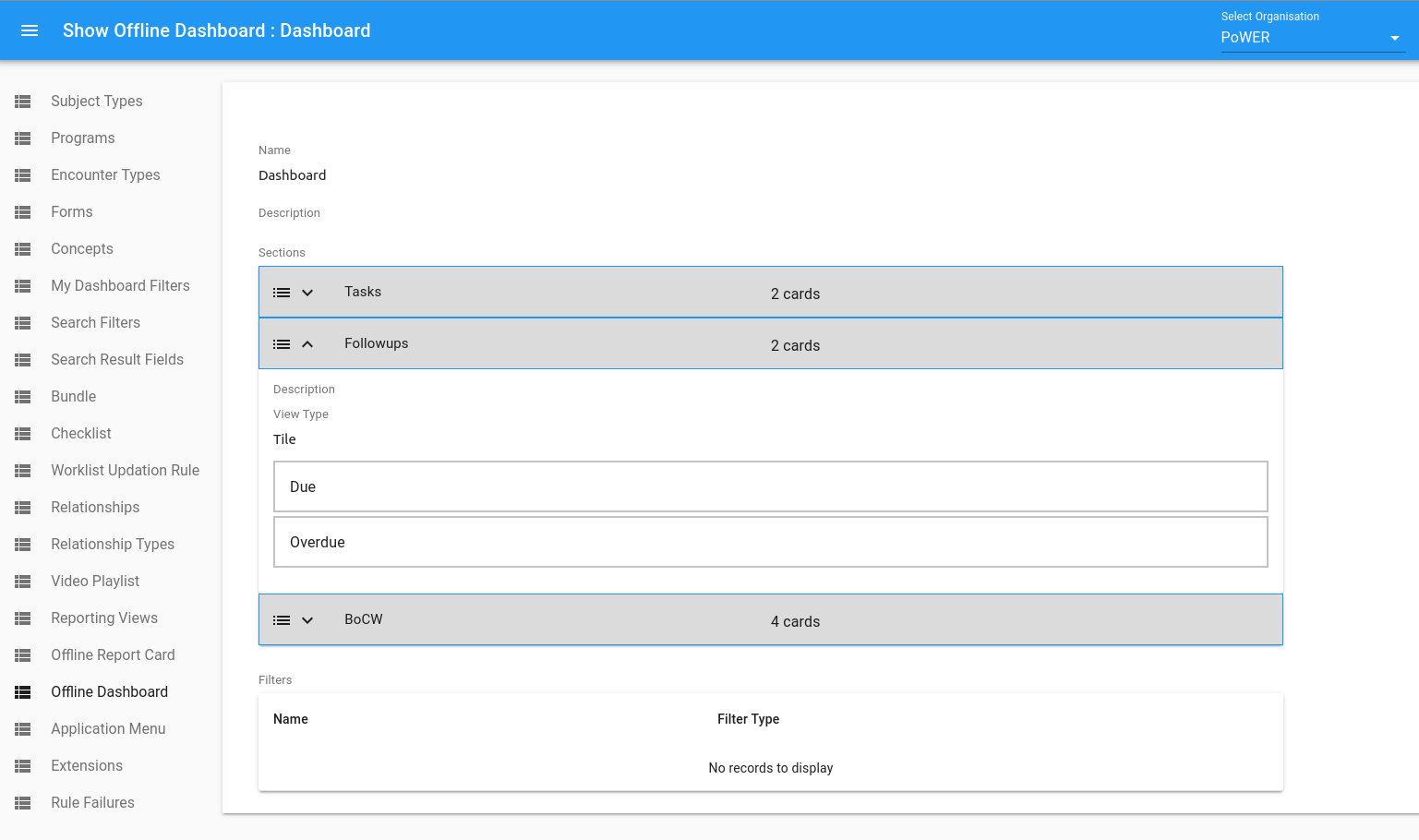
After all the cards are done it's time to group them together using the dashboard. Offline Dashboards have the following sub-components:
- Sections : Visual Partitions used to club together cards of specific grouping type
- Offline (Custom) Report Cards : Usually Clickable blocks with count information about grouping of Individuals or EntityApprovals of specific type
- Filters : Configurable filters that get applied to all "Report Cards" count and listing
Users with access to the "App Designer" can Create, Modifiy or Delete Custom Dashboards as seen below.
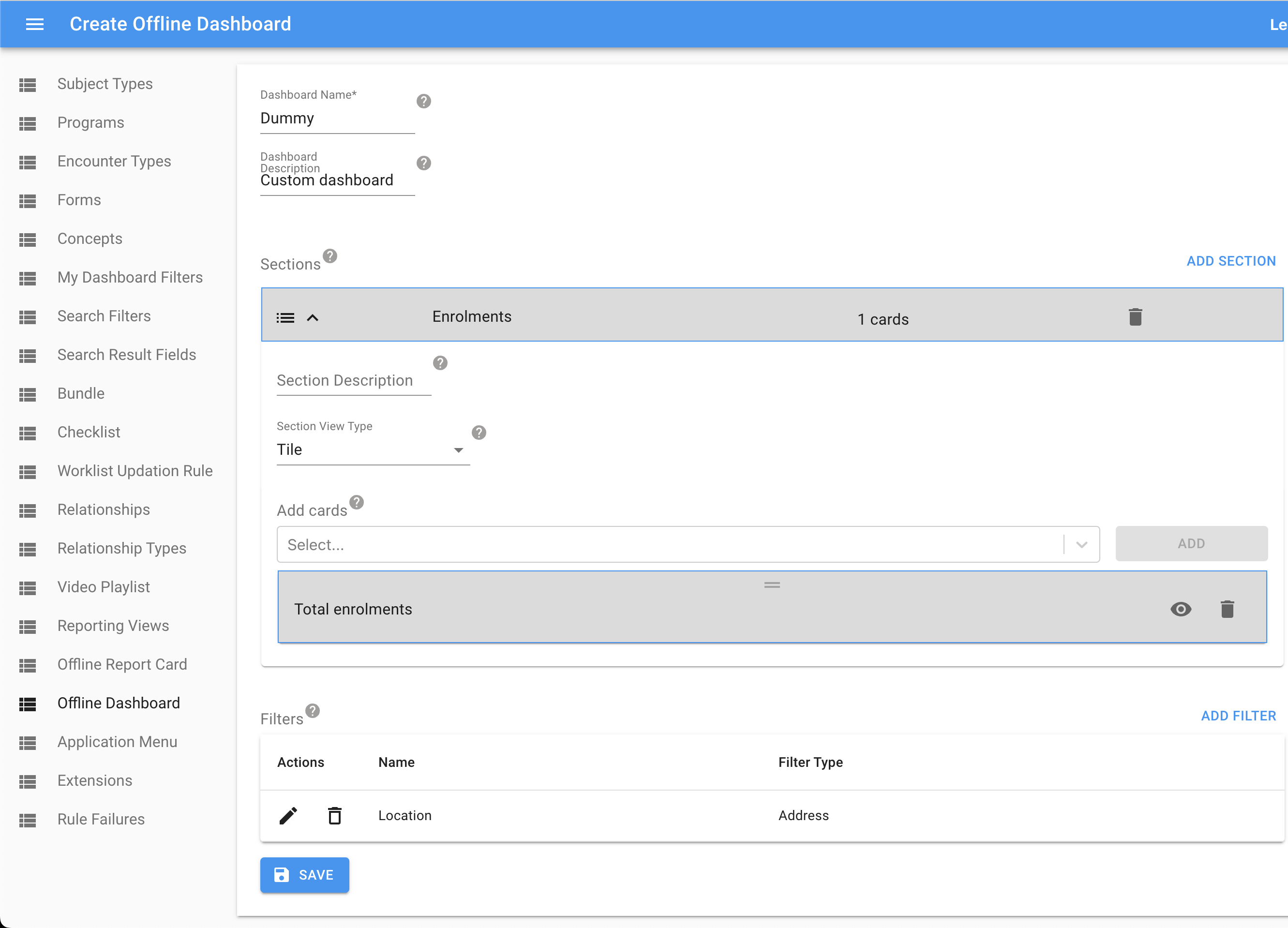
Steps to configure a Custom Dashboard
- Click on the dashboard tab on the app designer and click on the new dashboard.
- This will take you to the new dashboard screen. Provide the name and description of the dashboard.
- You can create sections on this screen and
- Select all the cards you need to add to the section in the dashboard.
- After adding all the cards, you can re-arrange the cards in the order you want them to see in the field app.
Dashboard Filters
You can also create filters for a dashboard on the same screen by clicking on "Add Filter". This shows a popup as in the below screenshot where you can configure your filter and set the filter name, type, widget type and other values based on your filter type.
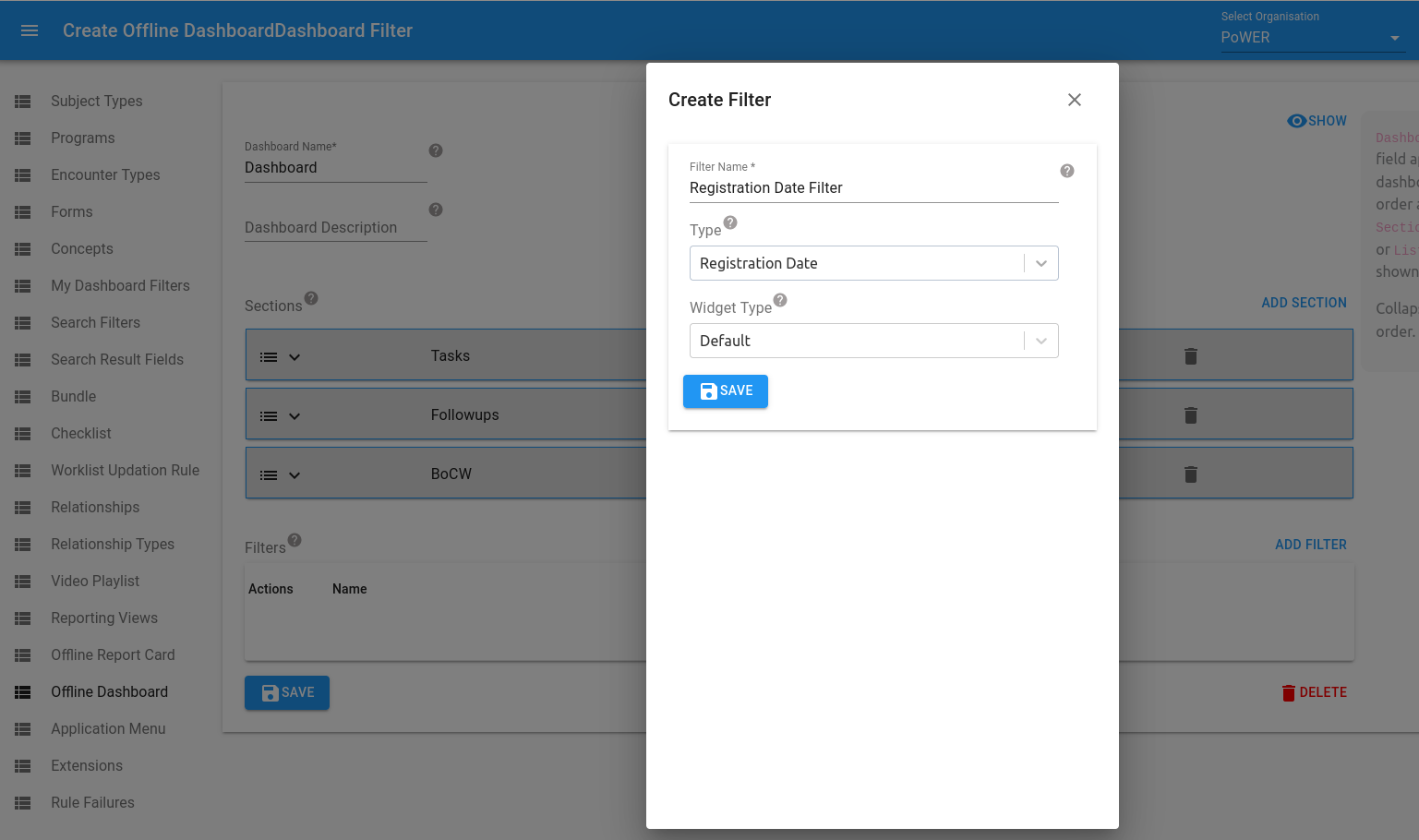
Once all the changes are done. Save the dashboard.
For the filters to be applied to the cards in the dashboard, the code for the cards will need to handle the filters.
Sample Code for handling filters in report card:
'use strict';
({params, imports}) => {
//console.log('------>',params.ruleInput.filter( type => type.Name === "Gender" ));
//console.log("params:::", JSON.stringify(params.ruleInput));
  let individualList = params.db.objects('Individual').filtered("voided = false and subjectType.name = 'Individual'" )
     .filter( (individual) => individual.getAgeInYears() >= 18 && individual.getAgeInYears() <= 49  &&  individual.getObservationReadableValue('Is sterilisation done') === 'No');

  if (params.ruleInput) {

       let genderFilter = params.ruleInput.filter(rule => rule.type === "Gender");
       let genderValue = genderFilter[0].filterValue[0].name;

        console.log('genderFilter---------',genderFilter);
        console.log('genderValue---------',genderValue);

      return individualList
     .filter( (individual) => {
     console.log("individual.gender:::", JSON.stringify(individual.gender.name));
     return individual.gender.name === genderValue;
     });
     }
     else return individualList;
};
Assigning custom Dashboards to User Groups
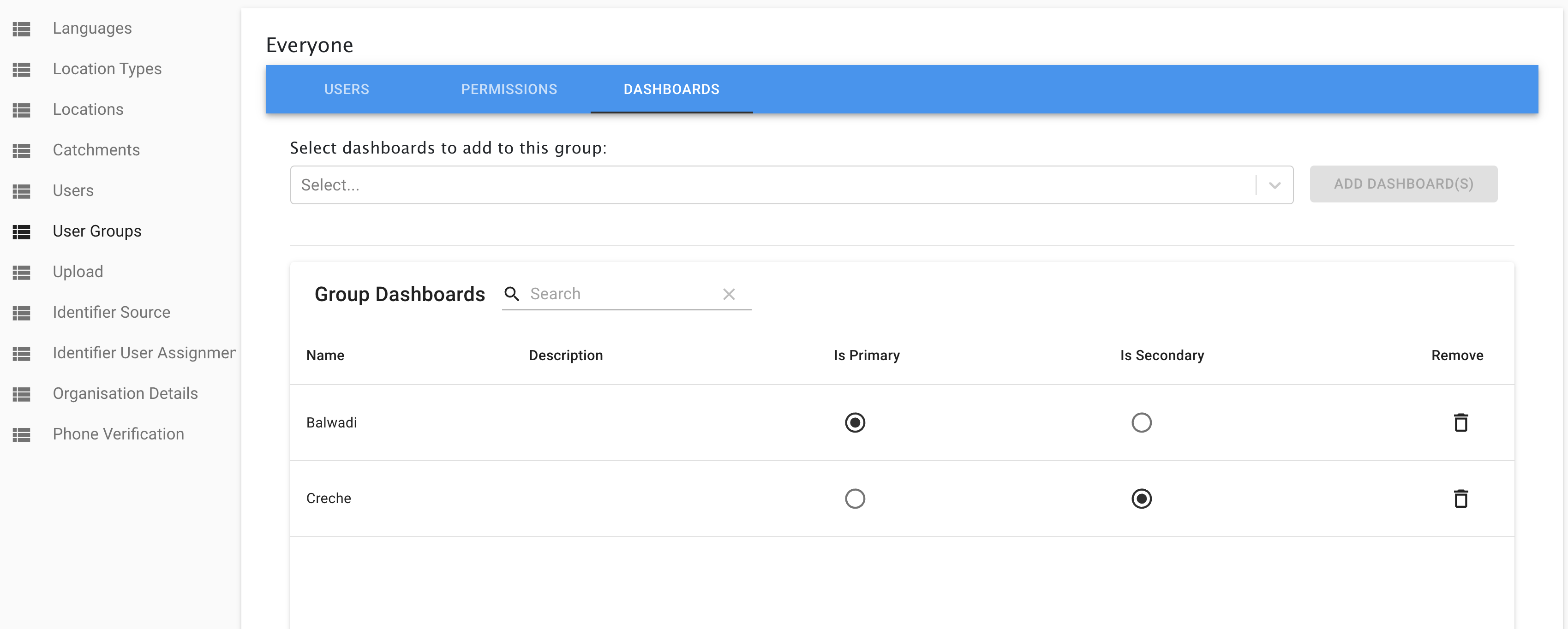
Custom Dashboards created need to be assigned specifically to a User Group, in-order for Users to see it on the Avni-client mobile app. You may do this, by navigating to the "Admin" app -> "User Groups" -> (User_GROUP) -> "Dashboards" tab, and assigning one or more Custom Dashboards to a User-Group.
In addition, You can also mark one of these Custom Dashboards as the Primary (Is Primary: True) dashboard from the "Admin" app -> "User Groups" -> (User_GROUP) -> "Dashboards".
Using the Dashboard in the Field App
After saving the dashboard sync the field app, and from the bottom "More" tab click on the "Dashboards" option. It will take you to the dashboard screen and will show all the cards that are added to the dashboard.
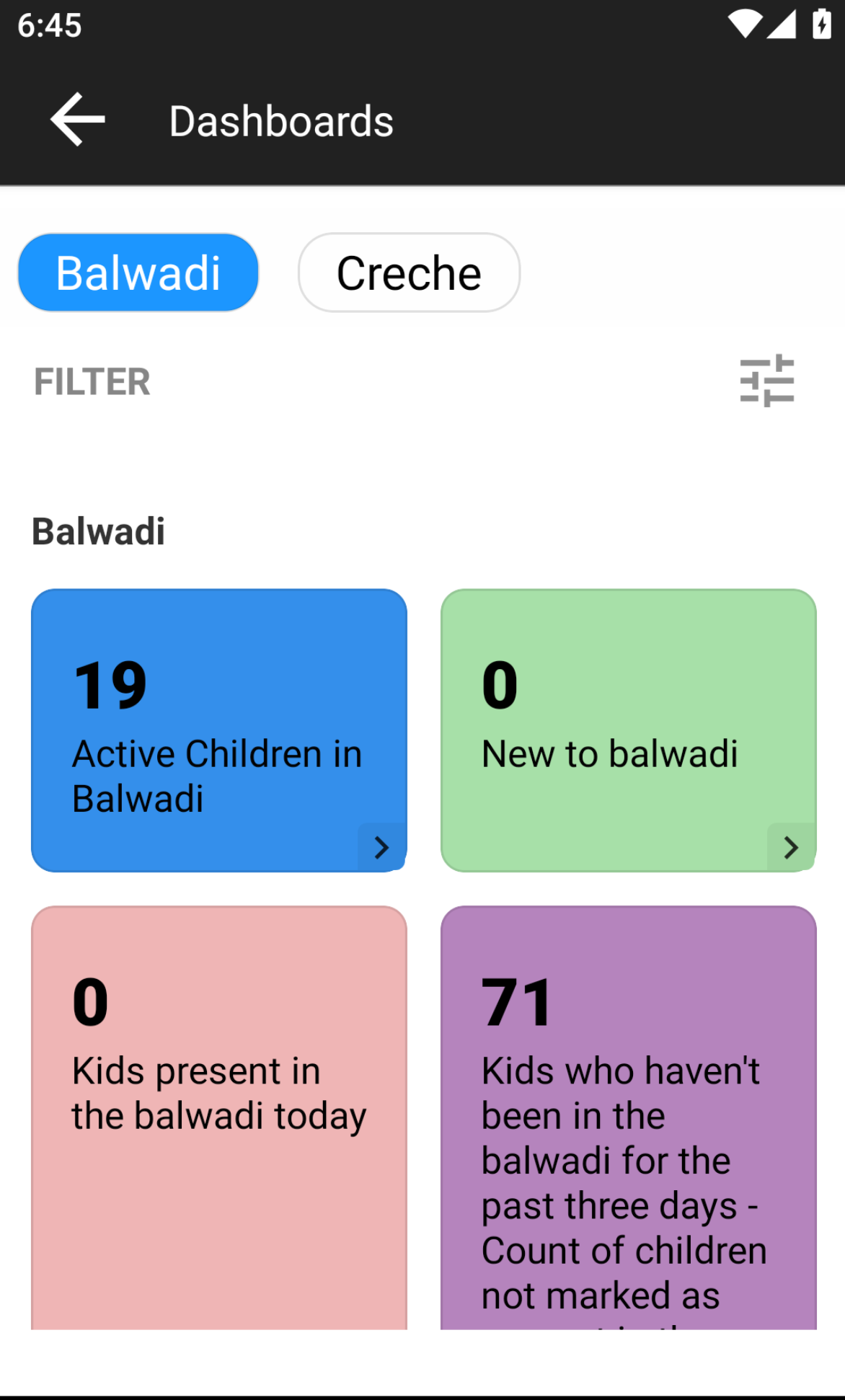
Report cards only passing List of subjects.
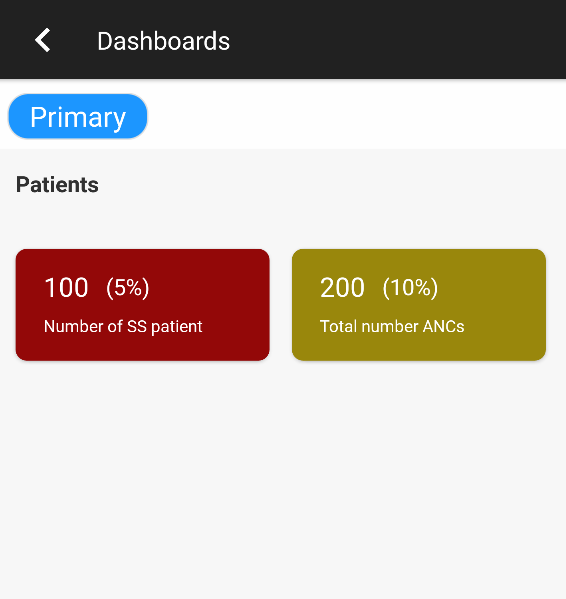
Report cards returning primaryValue and secondaryValue object
Clicking any card will take the user to the subject listing page, which will display all the subject names returned by the card query. For custom data cards with the "View subject profile" action, if only one subject is returned, the app directly opens the subject's profile. For cards with the "Do visit" action, clicking opens the encounter form directly (for single subject) or shows the list with encounter type rows below each subject. For cards with the "Mark attendance" action, tapping a class opens the attendance sheet for that class and attendance type for today (Android only — see the Mark Attendance Action section above).
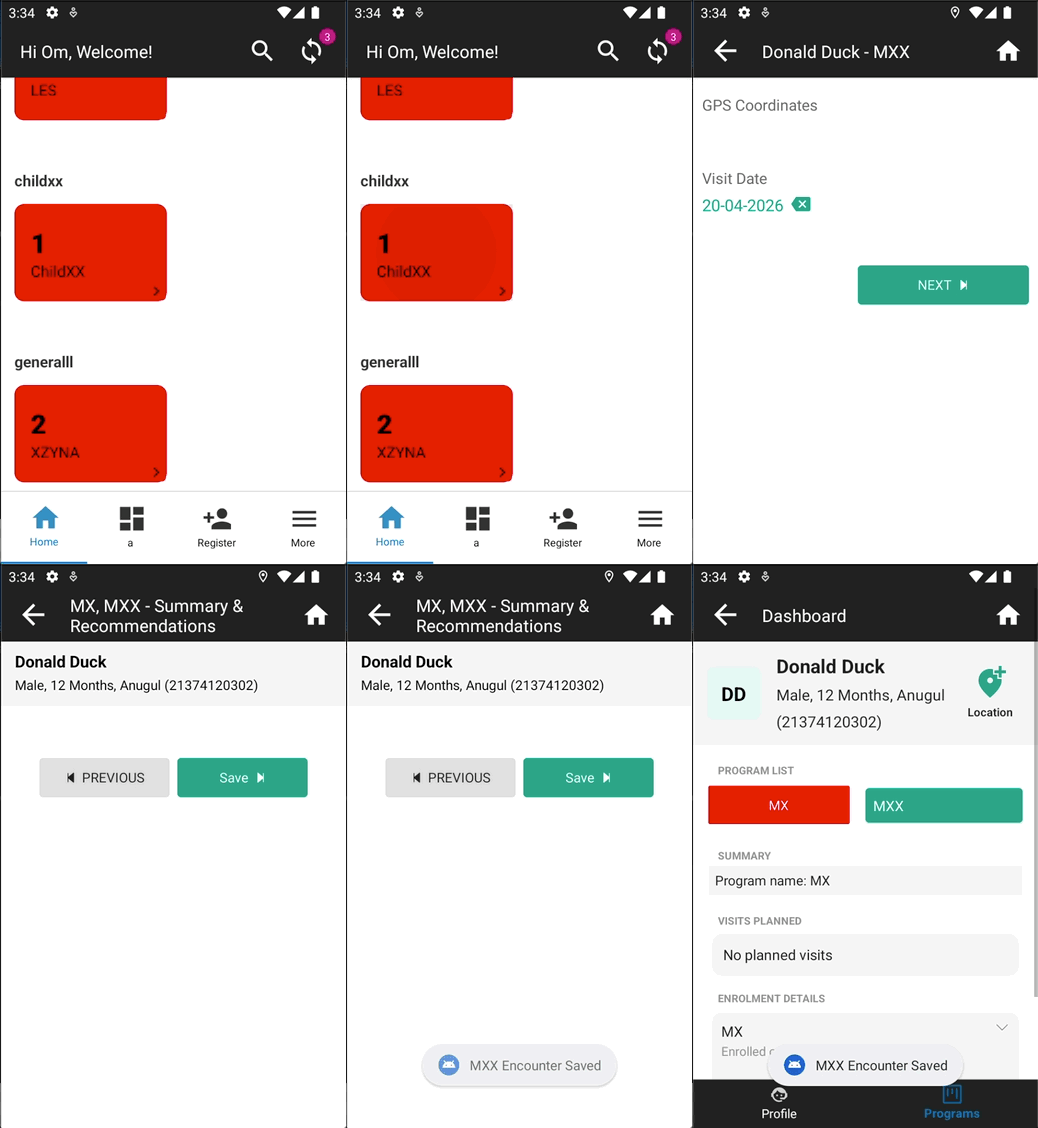
One subject registered and Do Visit action configured
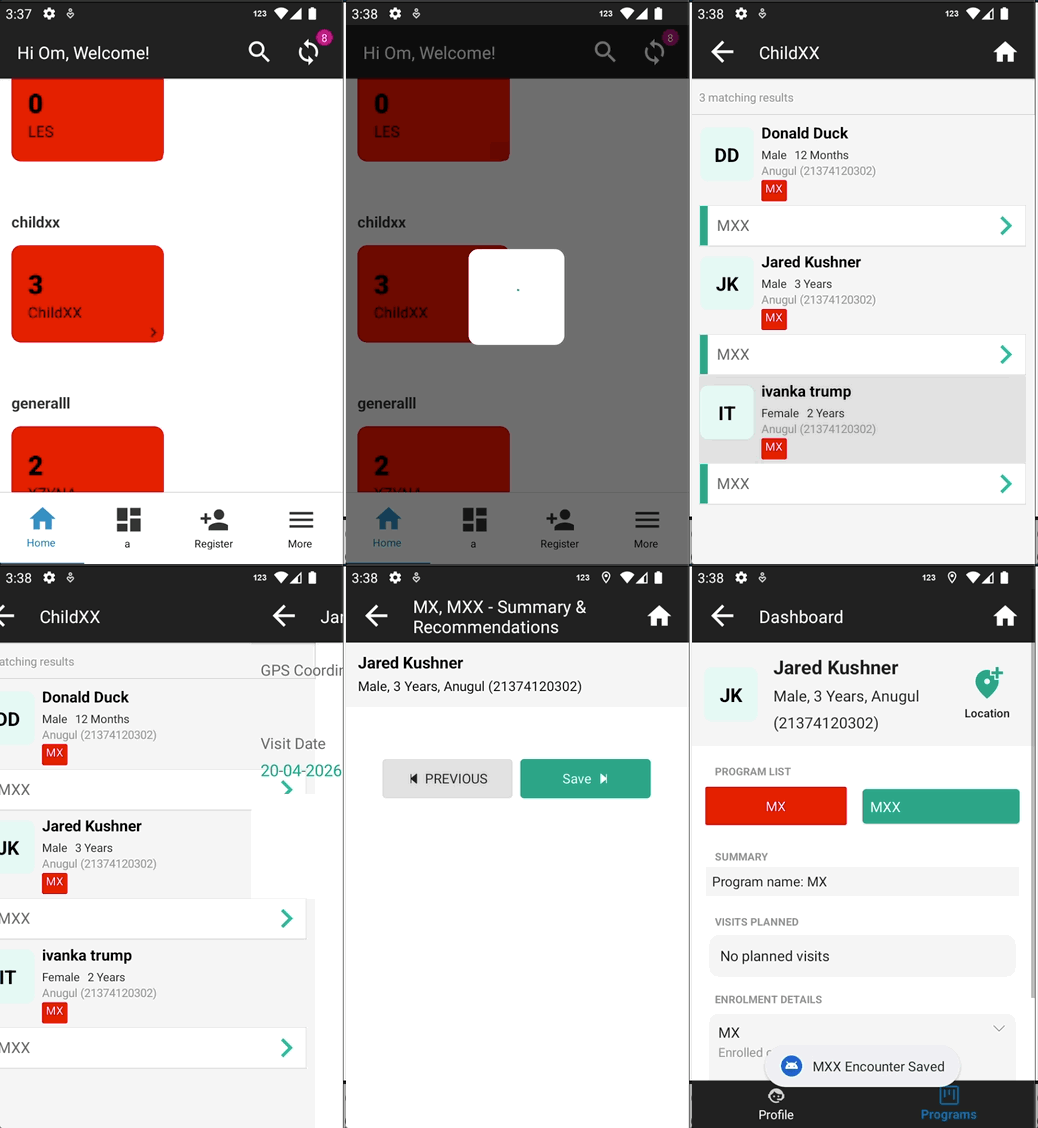
Multiple subjects registered and Do Visit action configured
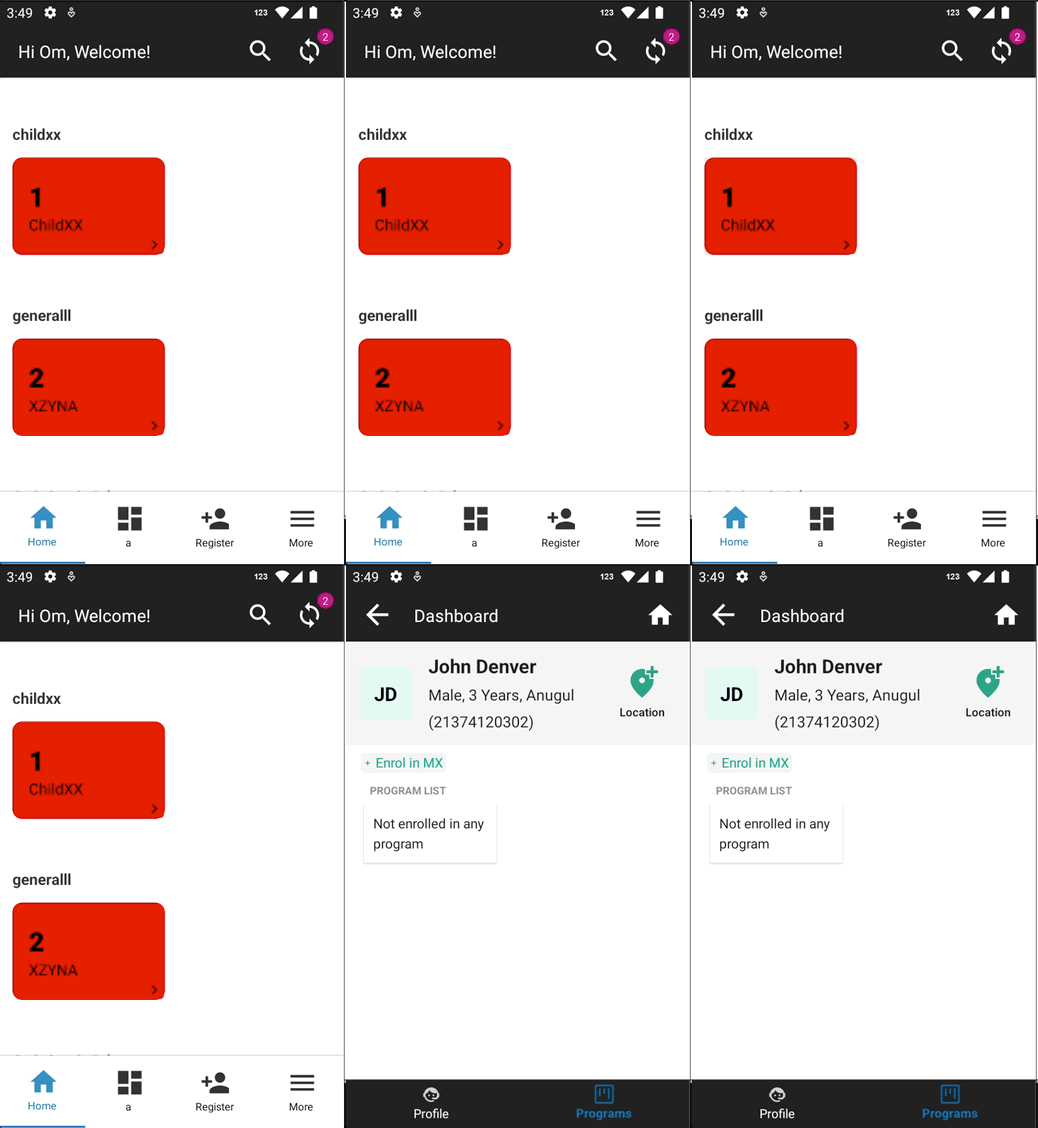
One subject registered and View Subject Profile action configured
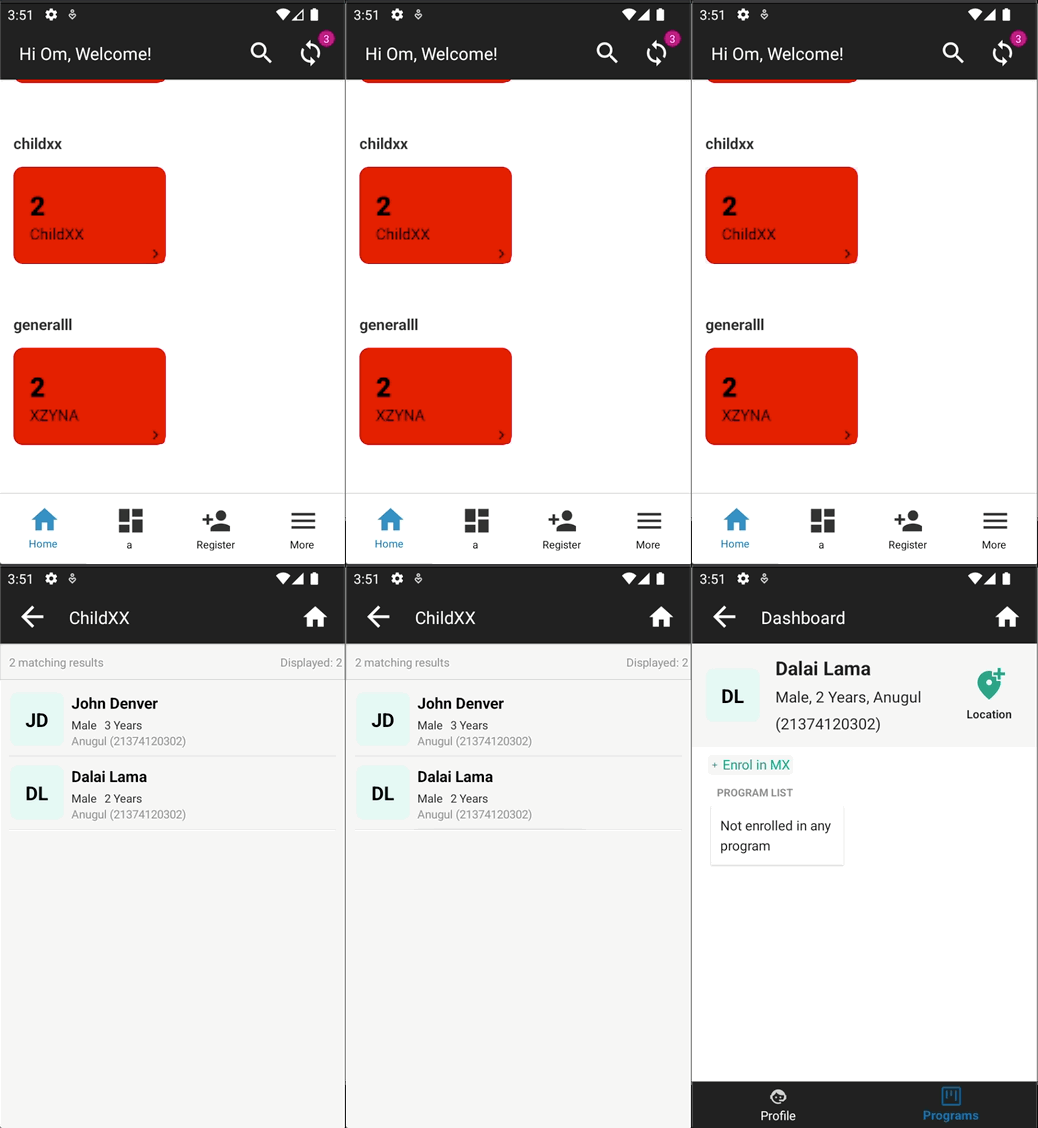
Multiple subjects registered and View Subject Profile action configured
Users can click on any subject and navigate to their dashboard.
Secondary Dashboard
Web app configuration
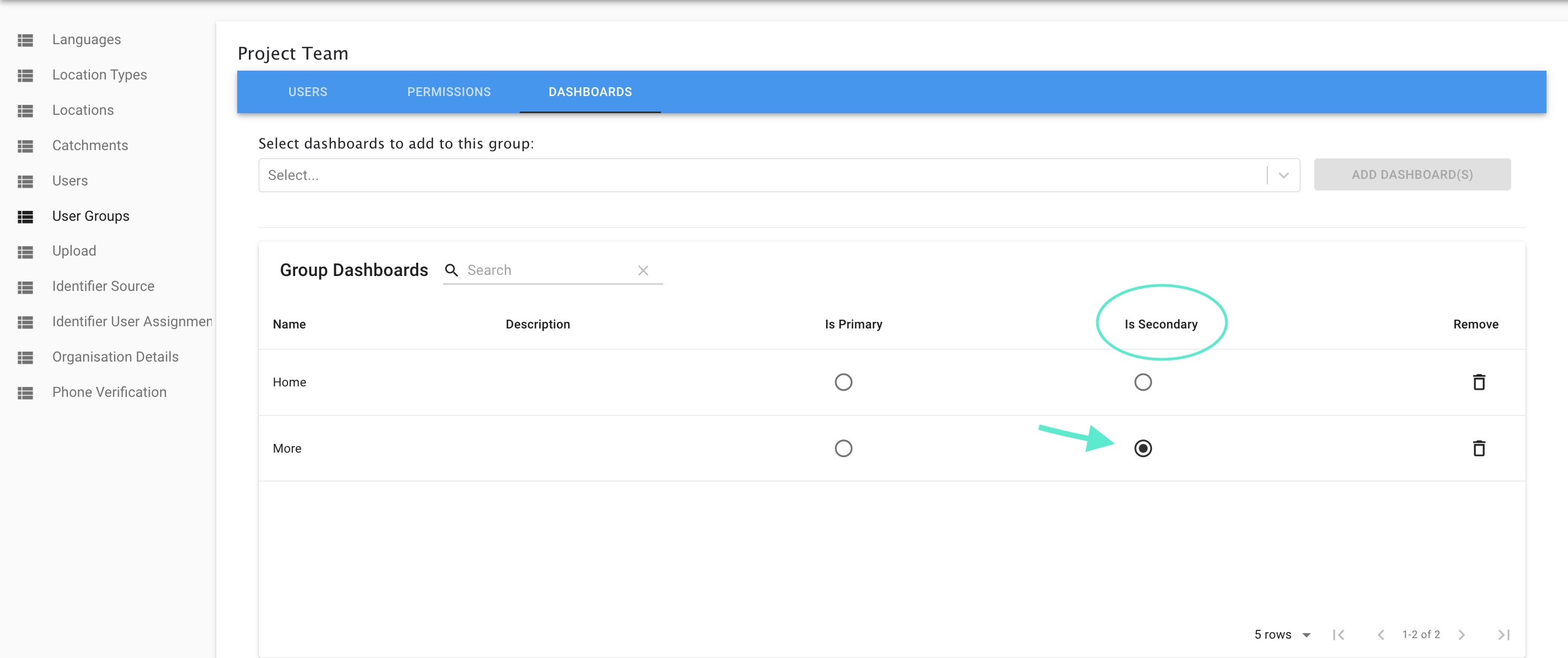
As part of Avni release 8.0.0, a new feature of a secondary dashboard is added which can be configured at user group level to populate an additional option on the Avni mobile app bottom drawer to navigate to a secondary dashboard. This configuration has to be done in the user group in Avni web app.
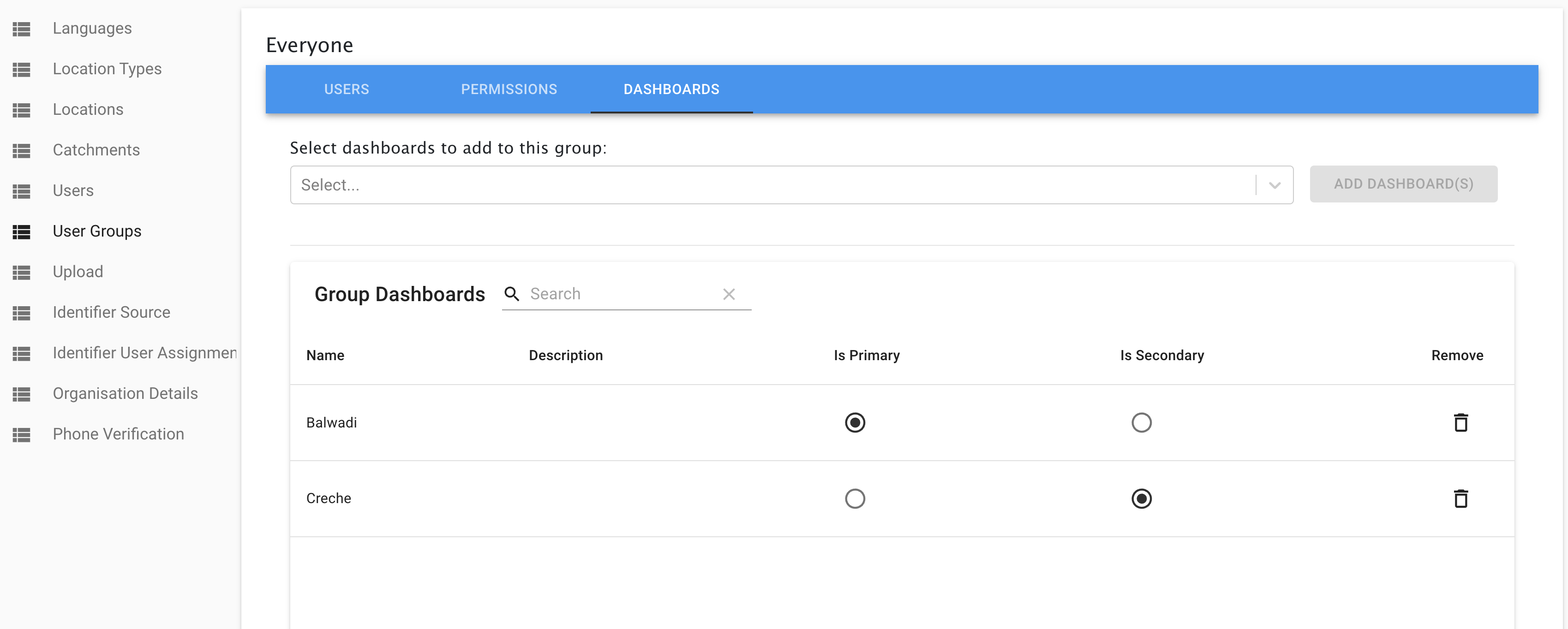
- By navigating to the dashboard section in a particular user group where dashboards can be added to user groups, the secondary dashboard can be defined apart from the home dashboard. As shown in the screenshot below, any dashboard can be selected as the secondary dashboard.
Secondary dashboard in mobile app
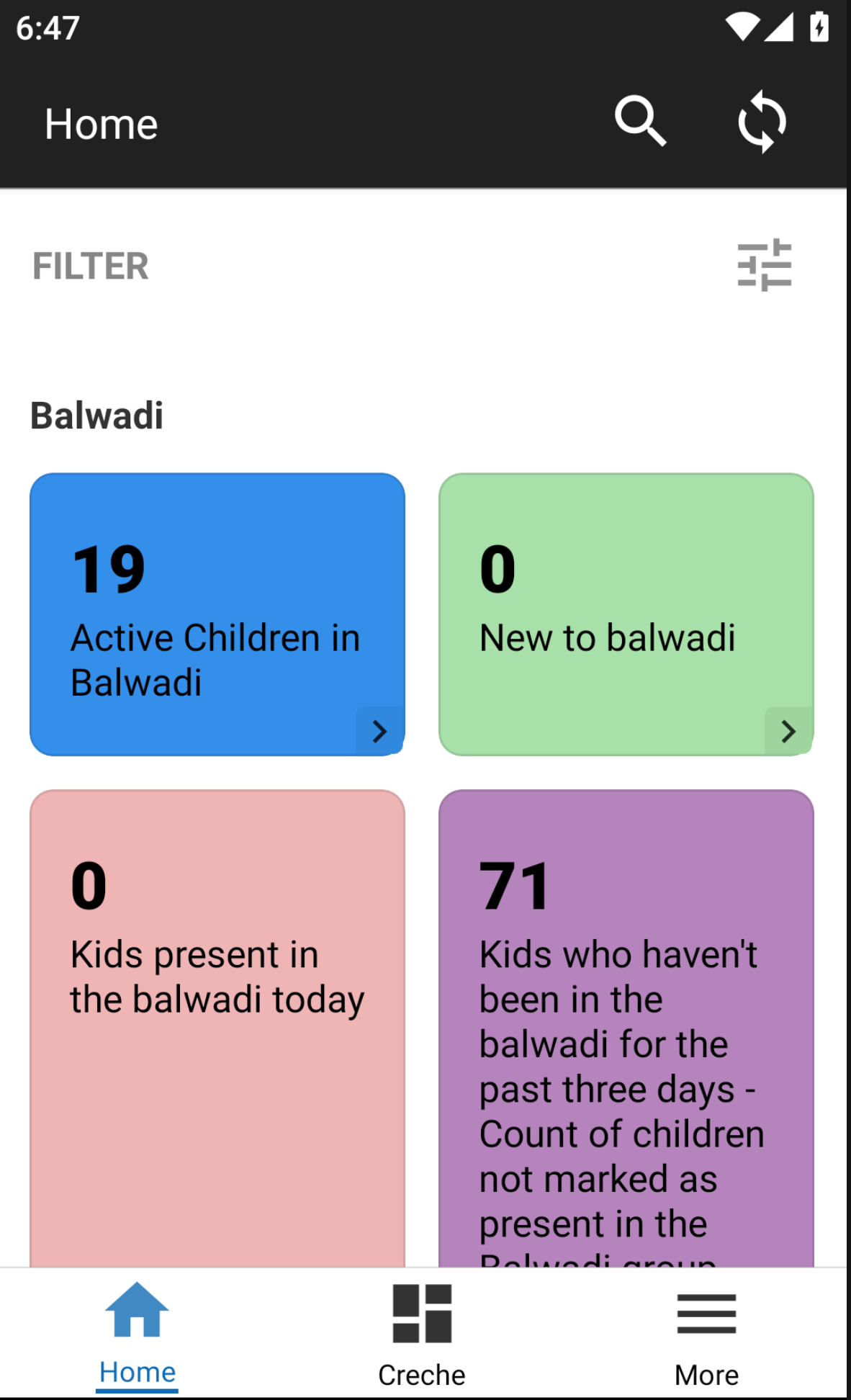
The configuration mentioned above would display the particular dashboard in the mobile app as given below. This would allow users to access the home and secondary dashboard from the bottom drawer of the mobile app instead of navigating to the more page.
Clash in Dashboards configuration across different UserGroups
In-case a User belongs to multiple UserGroups, where-in each has a different Primary and/or Secondary Dashboards, then the behaviour is undeterministic. I.e, any of the possible Primary Dashboards across the various UserGroups, would show up as the Primary on the app. Similar behaviour should be expected of the Secondary Dashboard as well.
Report card query examples
Report cards written for the new database follow a different pattern. See Writing report cards that work on the new database in the rules guide.
As mentioned earlier, a query can return a list of Individuals or an object with properties:
{
    primaryValue: '20',
    secondaryValue: '(5%)',
    cardColor: '#123456',    // overrides card background color
    textColor: '#ffffff',    // overrides card text color
    cardName: 'Dynamic Name', // overrides card name on tile and list header
    lineListFunction: () => [...] // returns list of subjects; makes card tappable
}
primaryValue is the main display value. lineListFunction should return the list of subjects — if not provided or not a function, the card displays the value but is not tappable. cardColor, textColor, and cardName are optional and override the static values configured in the admin UI.
DB instance is passed using the params and useful libraries like lodash and moment are available in the imports parameter of the function. Below are some examples of writing the lineListFunction.
The below function returns a list of pregnant women having any high-risk conditions.
'use strict';
({params, imports}) => {
    const isHighRiskWomen = (enrolment) => {
        const weight = enrolment.findLatestObservationInEntireEnrolment('Weight');
        const hb = enrolment.findLatestObservationInEntireEnrolment('Hb');
        const numberOfLiveChildren = enrolment.findLatestObservationInEntireEnrolment('Number of live children');
        return (weight && weight.getReadableValue() < 40) || (hb && hb.getReadableValue() < 8) ||
            (numberOfLiveChildren && numberOfLiveChildren.getReadableValue() > 3)
    };
    return {
      lineListFunction: () => params.db.objects('Individual')
        .filtered(`SUBQUERY(enrolments, $enrolment, SUBQUERY($enrolment.encounters, $encounter, $encounter.encounterType.name = 'Monthly monitoring of pregnant woman' and $encounter.voided = false).@count > 0 and $enrolment.voided = false and voided = false).@count > 0`)
        .filter((individual) => individual.voided === false && _.some(individual.enrolments, (enrolment) => enrolment.program.name === 'Pregnant Woman' && isHighRiskWomen(enrolment)))
    }
};
It is important to write optimised query and load very less data in memory for processing. There will be the cases where query can't be written in realm and we need to load the data in memory, but remember more data we load into the memory slower will be the reports. As an example consider below two cases, in the first case we directly query realm to fetch all the individuals enrolled in Child program, but in the second case we first load all individuals into memory and then filter those cases.
'use strict';
({params, imports}) => ({
    lineListFunction: () => params.db.objects('Individual')
        .filtered(`SUBQUERY(enrolments, $enrolment, $enrolment.program.name = 'Child' and voided = false).@count > 0`)
});
'use strict';
({params, imports}) => {
return params.db.objects('Individual')
.filter((individual) => individual.voided === false && _.some(individual.enrolments, (enrolment) => enrolment.program.name === 'Child'))
};For using the filters in the rules also check section on Dashboard Card Rule here - Writing rules
Performance of queries
The report cards requires one to return a list individuals. This can be done by:
- Performing db.objects on Individual and filtering them down.
- Performing db.objects on descendants of Subject (like encounter, enrolment), filter them down, then return list of Individuals from each filtered object. Example is given below.
Implementation Patterns for writing performant queries
Please refer to this reference for Realm Query Language.
To understand difference between filter and filtered that is referred below, please see, https://avni.readme.io/docs/writing-rules#difference-between-filter-and-filtered
Please also get in touch with platform team if you identify a new pattern and a new type of requirement where none of the following fits.
- Filter based on chronological data
- The matching has to be done on specific chronological descendant entity. e.g.
firstencounter of a specific type,recentencounter of specific type. - In this case performing
db.objectson Individual will lead to either very complex queries or will demand performing filtering in memory using JS. - In this case one can do
db.objectson descendant entity and then use something like.filtered('TRUEPREDICATE sort(programEnrolment.individual.uuid asc , encounterDateTime desc) Distinct(programEnrolment.individual.uuid)')to get the chronological relevant entity at the top in each group. Distinct keyword picks only the first entity in the sorted group. - After performing
filtered, one can return Subjects by performinglist.map(enc => enc.programEnrolment.individual)
- The matching has to be done on specific chronological descendant entity. e.g.
- Filter based exact observation value
- Matching observations by loading them in memory and calling JS functions will lead to slower reports.
- A combination of
subqueryand realm query based match will have much better performance. For example: matching observation that has a specific value -SUBQUERY(observations, $observation, $observation.concept.name = 'Phone number' and $observation.valueJSON CONTAINS '7555795537'
- Filter based on exact specific coded observation value
- Matching coded value using its name will require one to load data in memory and perform the match. But this could result in sub-optimal performance. Hence the readability of the report should be sacrificed here for performance.
- The query will be like
SUBQUERY(observations, $observation, $observation.concept.uuid = 'Marital Status' and $observation.valueJSON CONTAINS 'fb1080b4-d1ec-4c87-a10d-3838ba9abc5b' - Please note here that multiple observations can be matched here using OR, AND etc.
- Filter based on a custom observation value expression.
- Instead of matching against a single value match using numeric expression. e.g. match BMI greater than 20.0.
- This kind of match cannot be done using realm query and implementing them in JS may result in poor performance.
- In such cases we should find out the significance of magic number 20.0. Usually we also have a coded decision observation associated that has meaning behind 20.0, like malnutrition status, BMI Status etc. If there is one then we should match against that using pattern 3 above. If such observation is not present then consider adding them to decisions.
- In requirements where such associated coded observation are not present and cannot be added, the performance will depend on the number of observations and entities being matched. If this number is large the performance is expected to be slow, it is better to avoid making reports, or move such reports to their own dashboard - so that they don't impact the usability of other reports.
Detailed examples
DEPRECATED: Avoid using generic functions:
- The following is deprecated cause we should use
Filter based on chronological datapattern from above. - To find observation of a concept avoid using the function
findLatestObservationInEntireEnrolmentunless absolutely necessary since it searches for the observation in all encounters and enrolment observations. Use specific functions. - Eg: To find observation in enrolment can use the function
enrolment.findObservationor to find observations in specific encounter type can get the encounters usingenrolment.lastFulfilledEncounter(...encounterTypeNames)and then find observation. Refer code examples for the below 3 usecases. -
Find children with birth weight less than 2. Birth weight is captured in enrolment'use strict'; ({params, imports}) => { const isLowBirthWeight = (enrolment) => { const obs = enrolment.findObservation('Birth Weight'); return obs ? obs.getReadableValue() <= 2 : false; }; return params.db.objects('Individual') .filtered(`voided = false and SUBQUERY(enrolments, $enrolment, $enrolment.program.name = 'Child' and $enrolment.programExitDateTime = null and $enrolment.voided = false).@count > 0`) .filter((individual) => _.some(individual.enrolments, enrolment => enrolment.program.name === 'Child' && _.isNil(enrolment.programExitDateTime) && !enrolment.voided && isLowBirthWeight(enrolment))) };'use strict'; ({params, imports}) => { const isLowBirthWeight = (enrolment) => { const obs = enrolment.findLatestObservationInEntireEnrolment('Birth Weight'); return obs ? obs.getReadableValue() <= 2 : false; }; return params.db.objects('Individual') .filtered(`SUBQUERY(enrolments, $enrolment, $enrolment.program.name = 'Child' and $enrolment.programExitDateTime = null and $enrolment.voided = false and SUBQUERY($enrolment.observations, $observation, $observation.concept.uuid = 'c82cd1c8-d0a9-4237-b791-8d64e52b6c4a').@count > 0 and voided = false).@count > 0`) .filter((individual) => individual.voided === false && _.some(individual.enrolments, enrolment => enrolment.program.name === 'Child' && isLowBirthWeight(enrolment))) };do voided check first in realm instead of JS - helps in filtering ahead Check for concept where it is used - no need to check in all encounters and enrolmentFind MAM status from value of Nutritional status concept captured in Child Followup encounter// While this example is illustrating the right JS function to use, but it may be better to filter(ed) // encounter schema than to start with Individual // i.e. someting like db.objects("ProgramEncounter").filtered("programEnrolment.individual.voided = false AND programEnrolment.voided = false AND ...") // then return Individuals using .map(enc => enc.programEnrolment.individual) after filtering all program encounters 'use strict'; ({params, imports}) => { const isUndernourished = (enrolment) => { const encounter = enrolment.lastFulfilledEncounter('Child Followup'); if(_.isNil(encounter)) return false; const obs = encounter.findObservation("Nutritional status of child"); return (!_.isNil(obs) && _.isEqual(obs.getValueWrapper().getValue(), "MAM")); }; return params.db.objects('Individual') .filtered(`voided = false and SUBQUERY(enrolments, $enrolment,$enrolment.program.name = 'Child' and $enrolment.programExitDateTime = null and $enrolment.voided = false and SUBQUERY($enrolment.encounters, $encounter, $encounter.encounterType.name = 'Child Followup' and $encounter.voided = false).@count > 0).@count > 0`) .filter((individual) => individual.getAgeInMonths() > 6 && _.some(individual.enrolments, enrolment => enrolment.program.name === 'Child' && _.isNil(enrolment.programExitDateTime) && !enrolment.voided && isUndernourished(enrolment))) };'use strict'; ({params, imports}) => { const isUndernourished = (enrolment) => { const obs = enrolment.findLatestObservationInEntireEnrolment('Nutritional status of child'); return obs ? _.includes(['MAM'], obs.getReadableValue()) : false; }; return params.db.objects('Individual') .filtered(`SUBQUERY(enrolments, $enrolment, $enrolment.program.name = 'Child' and $enrolment.programExitDateTime = null and $enrolment.voided = false and SUBQUERY($enrolment.encounters, $encounter, $encounter.encounterType.name = 'Child Followup' and $encounter.voided = false and SUBQUERY($encounter.observations, $observation, $observation.concept.uuid = '3fb85722-fd53-43db-9e8b-d34767af9f7e').@count > 0).@count > 0 and voided = false).@count > 0`) .filter((individual) => individual.voided === false && individual.getAgeInMonths() > 6 && _.some(individual.enrolments, enrolment => enrolment.program.name === 'Child' && isUndernourished(enrolment))) };Check only in specific encounter typeFind sick children using the presence of value for concept 'Refer to the hospital for' which is not a mandatory concept// also see comments in Recommended way for use case 2 'use strict'; ({params, imports}) => { const isChildSick = (enrolment) => { const encounter = enrolment.lastFulfilledEncounter('Child Followup', 'Child PNC'); if(_.isNil(encounter)) return false; const obs = encounter.findObservation('Refer to the hospital for'); return !_.isNil(obs); }; return params.db.objects('Individual') .filtered(`voided = false and SUBQUERY(enrolments, $enrolment, $enrolment.program.name = 'Child' and $enrolment.programExitDateTime = null and $enrolment.voided = false).@count > 0`) .filter(individual => _.some(individual.enrolments, enrolment => enrolment.program.name === 'Child' && _.isNil(enrolment.programExitDateTime) && !enrolment.voided && isChildSick(enrolment))) };'use strict'; ({params, imports}) => { const isChildSick = (enrolment) => { const obs = enrolment.findLatestObservationFromEncounters('Refer to the hospital for'); return obs ? obs.getReadableValue() != undefined : false; }; return params.db.objects('Individual') .filtered(`SUBQUERY(enrolments, $enrolment, $enrolment.program.name = 'Child' and $enrolment.programExitDateTime = null and $enrolment.voided = false).@count > 0`) .filter((individual) => individual.voided === false && (_.some(individual.enrolments, enrolment => enrolment.program.name === 'Child' && isChildSick(enrolment))) ) };Check only in last encounter, not all encounters since the concept is not a mandatory concept. Using findLatestObservationFromEncounters will check in all encounters and mark child has sick even if the concept value had represented sick in any of the previous encounters, resulting in bug, since the concept is not a mandatory concept.
Based on the use case decide whether to write the logic using realm query or JS.
-
Not always achieving the purpose using realm queries might be efficient/possible.
-
DEPRECATED cause we should use
Filter based on chronological datapattern from above. Eg: consider a use case where a mandatory concept is used in a program encounter. Now to check the latest value of the concept, its sufficient to check the last encounter and need not iterate all encounters. Since realm subquery doesn't support searching only in the last encounter, for such usecases, using realm queries not only becomes slow and also sometimes inappropriate depending on the usecase. So in such cases, using JS code for the logic, is more efficient. (refer the below code example)Find dead children using concept value captured in encounter cancel or program exit form.
    ```javascript Recommended way
    'use strict';
    ({params, imports}) => \{
       const moment = imports.moment;

       const isChildDead = (enrolment) => \{
          const exitObservation = enrolment.findExitObservation('29238876-fbd8-4f39-b749-edb66024e25e');
          if(!_.isNil(exitObservation) && _.isEqual(exitObservation.getValueWrapper().getValue(), "cbb0969c-c7fe-4ce4-b8a2-670c4e3c5039"))
            return true;

          const encounters = enrolment.getEncounters(false);
          const sortedEncounters = _.sortBy(encounters, (encounter) => {
          return _.isNil(encounter.cancelDateTime)? moment().diff(encounter.encounterDateTime) :
          moment().diff(encounter.cancelDateTime)});
          const latestEncounter = _.head(sortedEncounters);
          if(_.isNil(latestEncounter)) return false;

          const cancelObservation = latestEncounter.findCancelEncounterObservation('0066a0f7-c087-40f4-ae44-a3e931967767');
          if(_.isNil(cancelObservation)) return false;
          return _.isEqual(cancelObservation.getValueWrapper().getValue(), "cbb0969c-c7fe-4ce4-b8a2-670c4e3c5039")
        \};

    return params.db.objects('Individual')
            .filtered(`voided = false`)
            .filter(individual => _.some(individual.enrolments, enrolment => enrolment.program.name === 'Child' && isChildDead(enrolment)));
    \}
'use strict'; ({params, imports}) => \{ return params.db.objects('Individual') .filtered(`subquery(enrolments, $enrolment, $enrolment.program.name == "Child" and subquery(programExitObservations, $exitObservation, $exitObservation.concept.uuid == "29238876-fbd8-4f39-b749-edb66024e25e" and ( $exitObservation.valueJSON == '{"answer":"cbb0969c-c7fe-4ce4-b8a2-670c4e3c5039"}') ).@count > 0 ).@count > 0 OR subquery(enrolments.encounters, $encounter, $encounter.voided == false and subquery(cancelObservations, $cancelObservation, $cancelObservation.concept.uuid == "0066a0f7-c087-40f4-ae44-a3e931967767" and ( $cancelObservation.valueJSON == '{"answer":"cbb0969c-c7fe-4ce4-b8a2-670c4e3c5039"}') ).@count > 0 ).@count > 0`) .filter(ind => ind.voided == false) \};Moving to JS since realm query iterates through all encounters which can be avoided in JS In this cases since the intention is to find if child is dead, hence it can be assumed to be captured in the last encounter or in program exit form based on the domain knowledge -
-
Please also refer to
Filter based on a custom observation value expressionpattern above, before using this. Consider another use case, where observations of numeric concepts need to be compared. This is not possible to achieve via realm query since the solution would involve the need for JSON parsing of the stored observation. Hence JS logic is appropriate here. (refer below code example)Find children with birth weight less than 2. Birth weight is captured in enrolment
    ```javascript Recommended way
    'use strict';
    ({params, imports}) => {
        const isLowBirthWeight = (enrolment) => {
            const obs = enrolment.findObservation('Birth Weight');
            return obs ? obs.getReadableValue() <= 2 : false;
        };
        return params.db.objects('Individual')
            .filtered(`voided = false and SUBQUERY(enrolments, $enrolment, $enrolment.program.name = 'Child' and $enrolment.programExitDateTime = null and $enrolment.voided = false).@count > 0`)
            .filter((individual) => _.some(individual.enrolments, enrolment => enrolment.program.name === 'Child' && _.isNil(enrolment.programExitDateTime) && !enrolment.voided && isLowBirthWeight(enrolment)))
    };
'use strict'; ({params, imports}) => { const isLowBirthWeight = (enrolment) => { const obs = enrolment.findLatestObservationInEntireEnrolment('Birth Weight'); return obs ? obs.getReadableValue() <= 2 : false; }; return params.db.objects('Individual') .filtered(`SUBQUERY(enrolments, $enrolment, $enrolment.program.name = 'Child' and $enrolment.programExitDateTime = null and $enrolment.voided = false and SUBQUERY($enrolment.observations, $observation, $observation.concept.uuid = 'c82cd1c8-d0a9-4237-b791-8d64e52b6c4a').@count > 0 and voided = false).@count > 0`) .filter((individual) => individual.voided === false && _.some(individual.enrolments, enrolment => enrolment.program.name === 'Child' && isLowBirthWeight(enrolment))) };Moving to realm query for checking birth weight was not possible. If it were a equals comparison it can be achieved using 'CONTAINS' in realm -
-
-
But in cases where time complexity is the same for both cases, writing realm queries would be efficient to achieve the purpose. (refer below code example). Also refer to
Filter based on a custom observation value expressionpattern above.Find 13 months children who are completely immunised
  ```javascript Recommended way
  'use strict';
  ({params, imports}) => {
     return params.db.objects('Individual')
          .filtered(`voided = false and SUBQUERY(enrolments, $enrolment, $enrolment.program.name = 'Child' and $enrolment.programExitDateTime = null and $enrolment.voided = false and SUBQUERY(checklists, $checklist, SUBQUERY(items, $item, ($item.detail.concept.name = 'BCG' OR $item.detail.concept.name = 'Polio 0' OR $item.detail.concept.name = 'Polio 1' OR $item.detail.concept.name = 'Polio 2' OR $item.detail.concept.name = 'Polio 3' OR $item.detail.concept.name = 'Pentavalent 1' OR $item.detail.concept.name = 'Pentavalent 2' OR $item.detail.concept.name = 'Pentavalent 3' OR $item.detail.concept.name = 'Measles 1' OR $item.detail.concept.name = 'Measles 2' OR $item.detail.concept.name = 'FIPV 1' OR $item.detail.concept.name = 'FIPV 2' OR $item.detail.concept.name = 'Rota 1' OR $item.detail.concept.name = 'Rota 2') and $item.completionDate <> nil).@count = 14).@count > 0).@count > 0`)
          .filter(individual => individual.getAgeInMonths() >= 13)
  };
'use strict'; ({params, imports}) => \{ const isChildGettingImmunised = (enrolment) => { if (enrolment.hasChecklist) { const vaccineToCheck = ['BCG', 'Polio 0', 'Polio 1', 'Polio 2', 'Polio 3', 'Pentavalent 1', 'Pentavalent 2', 'Pentavalent 3', 'Measles 1', 'Measles 2', 'FIPV 1', 'FIPV 2', 'Rota 1', 'Rota 2']; const checklist = _.head(enrolment.getChecklists()); return _.chain(checklist.items) .filter(({detail}) => _.includes(vaccineToCheck, detail.concept.name)) .every(({completionDate}) => !_.isNil(completionDate)) .value(); } return false; }; return params.db.objects('Individual') .filtered(`SUBQUERY(enrolments, $enrolment, $enrolment.program.name = 'Child' and $enrolment.programExitDateTime = null and $enrolment.voided = false).@count > 0`) .filter((individual) => individual.voided === false && individual.getAgeInMonths() >= 13 && _.some(individual.enrolments, enrolment => enrolment.program.name === 'Child' && isChildGettingImmunised(enrolment))) \};Moving to realm query since no of children with age < 13 months were less -
-
In most cases, filtering as much as possible using realm queries (for cases like voided checks) and then doing JS filtering on top of it if needed, would be appropriate. (refer the below code example)
Find dead children using concept value captured in encounter cancel or program exit form.
  ```javascript Recommended way
  'use strict';
  ({params, imports}) => {
     const moment = imports.moment;

     const isChildDead = (enrolment) => {
        const exitObservation = enrolment.findExitObservation('29238876-fbd8-4f39-b749-edb66024e25e');
        if(!_.isNil(exitObservation) && _.isEqual(exitObservation.getValueWrapper().getValue(), "cbb0969c-c7fe-4ce4-b8a2-670c4e3c5039"))
          return true;

        const encounters = enrolment.getEncounters(false);
        const sortedEncounters = _.sortBy(encounters, (encounter) => {
        return _.isNil(encounter.cancelDateTime)? moment().diff(encounter.encounterDateTime) :
        moment().diff(encounter.cancelDateTime)});
        const latestEncounter = _.head(sortedEncounters);
        if(_.isNil(latestEncounter)) return false;

        const cancelObservation = latestEncounter.findCancelEncounterObservation('0066a0f7-c087-40f4-ae44-a3e931967767');
        if(_.isNil(cancelObservation)) return false;
        return _.isEqual(cancelObservation.getValueWrapper().getValue(), "cbb0969c-c7fe-4ce4-b8a2-670c4e3c5039")
      };

  return params.db.objects('Individual')
          .filtered(`voided = false`)
          .filter(individual => _.some(individual.enrolments, enrolment => enrolment.program.name === 'Child' && isChildDead(enrolment)));
  }
'use strict'; ({params, imports}) => { return params.db.objects('Individual') .filtered(`subquery(enrolments, $enrolment, $enrolment.program.name == "Child" and subquery(programExitObservations, $exitObservation, $exitObservation.concept.uuid == "29238876-fbd8-4f39-b749-edb66024e25e" and ( $exitObservation.valueJSON == '{"answer":"cbb0969c-c7fe-4ce4-b8a2-670c4e3c5039"}') ).@count > 0 ).@count > 0 OR subquery(enrolments.encounters, $encounter, $encounter.voided == false and subquery(cancelObservations, $cancelObservation, $cancelObservation.concept.uuid == "0066a0f7-c087-40f4-ae44-a3e931967767" and ( $cancelObservation.valueJSON == '{"answer":"cbb0969c-c7fe-4ce4-b8a2-670c4e3c5039"}') ).@count > 0 ).@count > 0`) .filter(ind => ind.voided == false); };Moving to JS since realm query iterates through all encounters which can be avoided in JS In this cases since the intention is to find if child is dead it can be assumed to be captured in the last encounter or in program exit form based on the domain knowledge -
Also check - https://avni.readme.io/docs/writing-rules#using-paramsdb-object-when-writing-rules
DEPRECATED. Use Concept UUIDs instead of their names for comparison
Please check - Filter based on a custom observation value expression pattern above.
Though not much performance improvement, using concept uuids(for comparing with concept answers), instead of getting its readable values did provide minor improvement(in seconds) when need to iterate through thousands of rows. (refer below code example)
-
Find children with congential abnormality based on values of certain concepts'use strict'; ({params, imports}) => { const isChildCongenitalAnamoly = (enrolment) => { const _ = imports.lodash; const encounter = enrolment.lastFulfilledEncounter('Child PNC'); if(_.isNil(encounter)) return false; const obs1 = encounter.findObservation("Is the infant's mouth cleft pallet seen?"); const condition2 = obs1 ? obs1.getValueWrapper().getValue() === '3a9fe9a1-a866-47ed-b75c-c0071ea22d97' : false; const obs2 = encounter.findObservation('Is there visible tumor on back or on head of infant?'); const condition3 = obs2 ? obs2.getValueWrapper().getValue() === '3a9fe9a1-a866-47ed-b75c-c0071ea22d97' : false; const obs3 = encounter.findObservation("Is foam coming from infant's mouth continuously?"); const condition4 = obs3 ? obs3.getValueWrapper().getValue() === '3a9fe9a1-a866-47ed-b75c-c0071ea22d97' : false; return condition2 || condition3 || condition4; }; const isChildCongenitalAnamolyReg = (individual) => { const obs = individual.findObservation('Has any congenital abnormality?'); return obs ? obs.getValueWrapper().getValue() === '3a9fe9a1-a866-47ed-b75c-c0071ea22d97' : false; }; return params.db.objects('Individual') .filtered(`voided = false and SUBQUERY(enrolments, $enrolment, $enrolment.program.name = 'Child' and $enrolment.programExitDateTime = null and $enrolment.voided = false).@count > 0`) .filter((individual) => (isChildCongenitalAnamolyReg(individual) || _.some(individual.enrolments, enrolment => enrolment.program.name === 'Child' && _.isNil(enrolment.programExitDateTime) && !enrolment.voided && isChildCongenitalAnamoly(enrolment) )) ) };
'use strict';
({params, imports}) => {
    const isChildCongenitalAnamoly = (enrolment) => {

         const obs1 = enrolment.findLatestObservationInEntireEnrolment("Is the infant's mouth cleft pallet seen?");
         const condition2 = obs1 ? obs1.getReadableValue() === 'Yes' : false;

     const obs2 = enrolment.findLatestObservationInEntireEnrolment('Is there visible tumor on back or on head of infant?');
         const condition3 = obs2 ? obs2.getReadableValue() === 'Yes' : false;

         const obs3 = enrolment.findLatestObservationInEntireEnrolment("Is foam coming from infant's mouth continuously?");
         const condition4 = obs3 ? obs3.getReadableValue() === 'Yes' : false;

         return condition2 || condition3 || condition4;
    };

    const isChildCongenitalAnamolyReg = (individual) => {
         const obs = individual.getObservationReadableValue('Has any congenital abnormality?');
         return obs ? obs === 'Yes' : false;
    };

    return params.db.objects('Individual')
        .filtered(`SUBQUERY(enrolments, $enrolment, $enrolment.program.name = 'Child' and $enrolment.programExitDateTime = null and $enrolment.voided = false).@count > 0`)
        .filter((individual) => individual.voided === false && (isChildCongenitalAnamolyReg(individual) ||
            _.some(individual.enrolments, enrolment => enrolment.program.name === 'Child' && isChildCongenitalAnamoly(enrolment) )) )
};Use concept uuid instead of readableValue to compare and check for value only in specific encounter type where the concept was used3. Nested Report Cards
Frequently there are cases where across report cards very similar logic is used and only a value used for comparison, changes. Eg: in one of our partner organisations, we load 'Total SAM children' and 'Total MAM children'. For rendering each takes around 20-30s. And hence the dashboard nos doesn't load until both the report card results are calculated and it makes the user to wait for a minute. If the logic is combined, we can render the results in 30s since it would need only retrieval from db and iterating once.
The above kind of scenarios also lead to code duplication across report cards and when some requirement changes, then the change needs to be done in both.
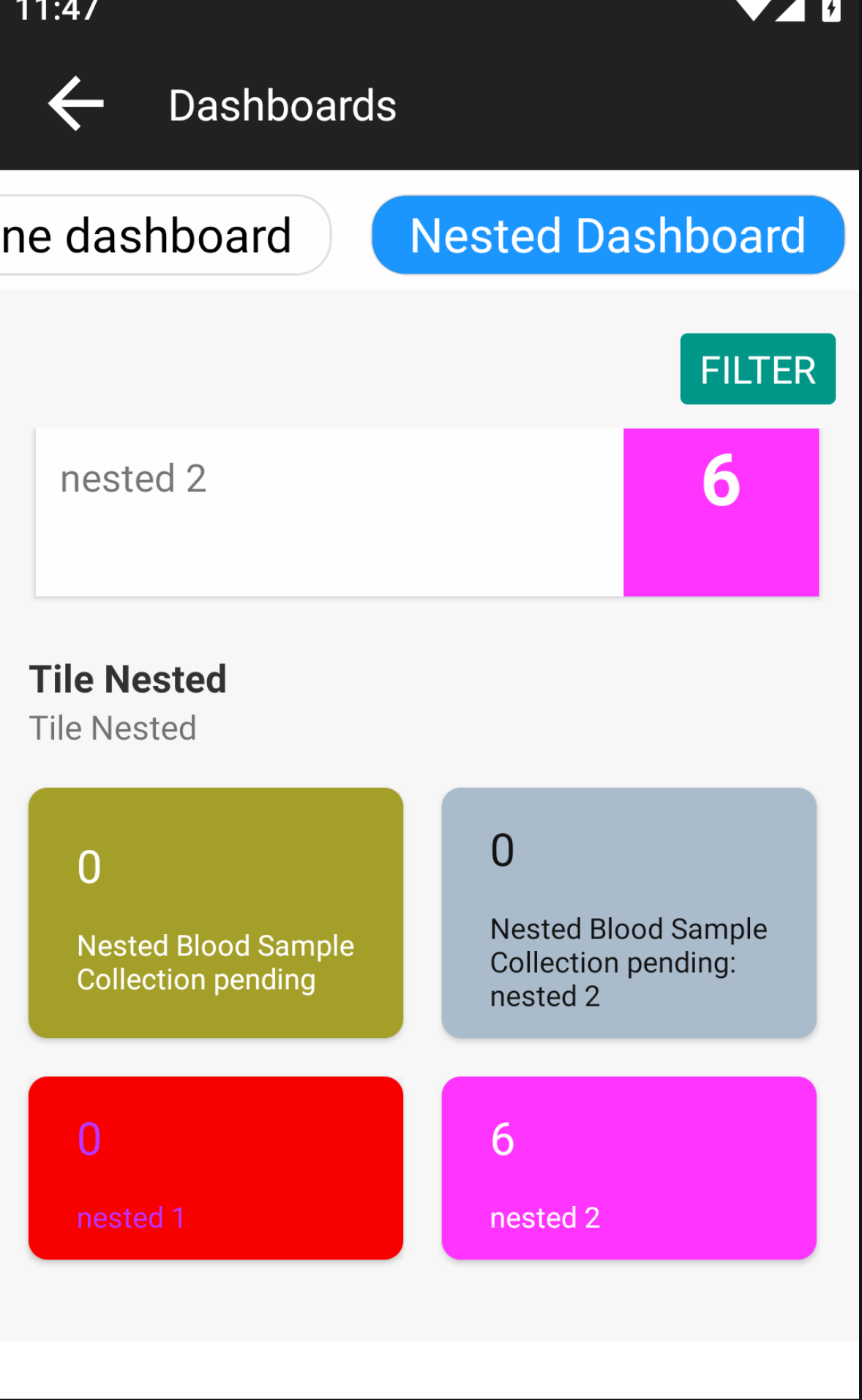
In-order to handle such scenarios, we recommend using the Nested Report Card. This is a non-standard report card, which has the ability to show upto a maximum of 9 report cards, based on a single Query's response.
The query can return an object with "reportCards" property, which holds within it an array of objets with properties, { cardName: 'nested-i', cardColor: '#123456', textColor: '#654321', primaryValue: '20', secondaryValue: '(5%)', lineListFunction: () => \{/\*Do something\\\\\\\*/} }. DB instance is passed using the params and useful libraries like lodash and moment are available in the imports parameter of the function.
'use strict';
({params, imports}) => {
    /*
    Business logic
    */
    return {reportCards: [
        {
            cardName: 'nested-i',
            cardColor: '#123456',
            textColor: '#654321',
            primaryValue: '20',
            secondaryValue: '(5%)',
            lineListFunction: () => {
                /*Do something*/
            }
        },
        {
            cardName: 'nested-i+1',
            cardColor: '#123456',
            textColor: '#654321',
            primaryValue: '20',
            secondaryValue: '(5%)',
            lineListFunction: () => {
                /*Do something*/
            }
        }
    ]
    }
};
- primaryValue
- secondaryValue
- lineListFunction- cardName
- cardColor
- textColor// Documentation - https://docs.mongodb.com/realm-legacy/docs/javascript/latest/index.html#queries
'use strict';
({params, imports}) => {
const _ = imports.lodash;
const moment = imports.moment;
const substanceUseDue = (enrolment) => {
const substanceUseEnc = enrolment.scheduledEncountersOfType('Record Substance use details');
const substanceUse = substanceUseEnc
.filter((e) => moment().isSameOrAfter(moment(e.earliestVisitDateTime)) && e.cancelDateTime === null && e.encounterDateTime === null );
return substanceUse.length > 0 ? true : false;
};
const indList = params.db.objects('Individual')
.filtered(`SUBQUERY(enrolments, $enrolment, $enrolment.program.name = 'Substance use' and $enrolment.programExitDateTime = null and $enrolment.voided = false and SUBQUERY($enrolment.encounters, $encounter, $encounter.encounterType.name = 'Record Substance use details' and $encounter.voided = false ).@count > 0 and voided = false).@count > 0`)
.filter((individual) => _.some(individual.enrolments, enrolment => substanceUseDue(enrolment)
));
const includingVoidedLength = indList.length;
const excludingVoidedLength = 6;
const llf1 = () => { return params.db.objects('Individual')
.filtered(`SUBQUERY(enrolments, $enrolment, $enrolment.program.name = 'Substance use' and $enrolment.programExitDateTime = null and $enrolment.voided = false and SUBQUERY($enrolment.encounters, $encounter, $encounter.encounterType.name = 'Record Substance use details' and $encounter.voided = false ).@count > 0 and voided = false).@count > 0`)
.filter((individual) => _.some(individual.enrolments, enrolment => substanceUseDue(enrolment)
));
};
return {reportCards: [{
cardName: 'nested 1',
textColor: '#bb34ff',
primaryValue: includingVoidedLength,
secondaryValue: null,
lineListFunction: llf1
},
{
cardName: 'nested 2',
cardColor: '#ff34ff',
primaryValue: excludingVoidedLength,
secondaryValue: null,
lineListFunction: () => {return params.db.objects('Individual')
.filtered(`SUBQUERY(enrolments, $enrolment, $enrolment.program.name = 'Substance use' and $enrolment.programExitDateTime = null and $enrolment.voided = false and SUBQUERY($enrolment.encounters, $encounter, $encounter.encounterType.name = 'Record Substance use details' and $encounter.voided = false ).@count > 0 and voided = false).@count > 0`)
.filter((individual) => individual.voided === false && _.some(individual.enrolments, enrolment => substanceUseDue(enrolment)
));}
}]}
};Screenshot of Nested Custom Dashboard Report Card Edit screen on Avni Webapp
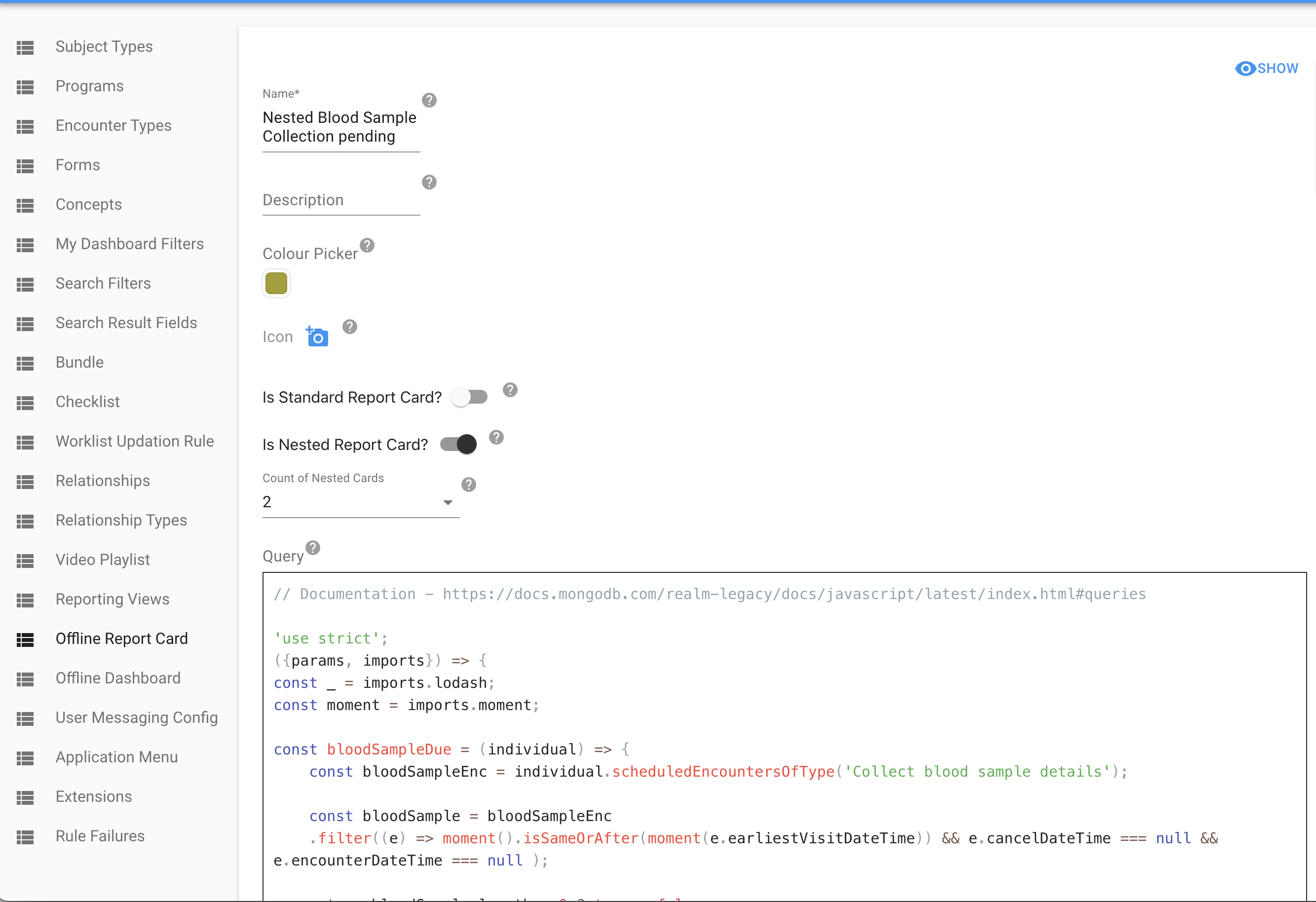
Screenshot of Nested Report Cards in Custom Dashboard in Avni Client
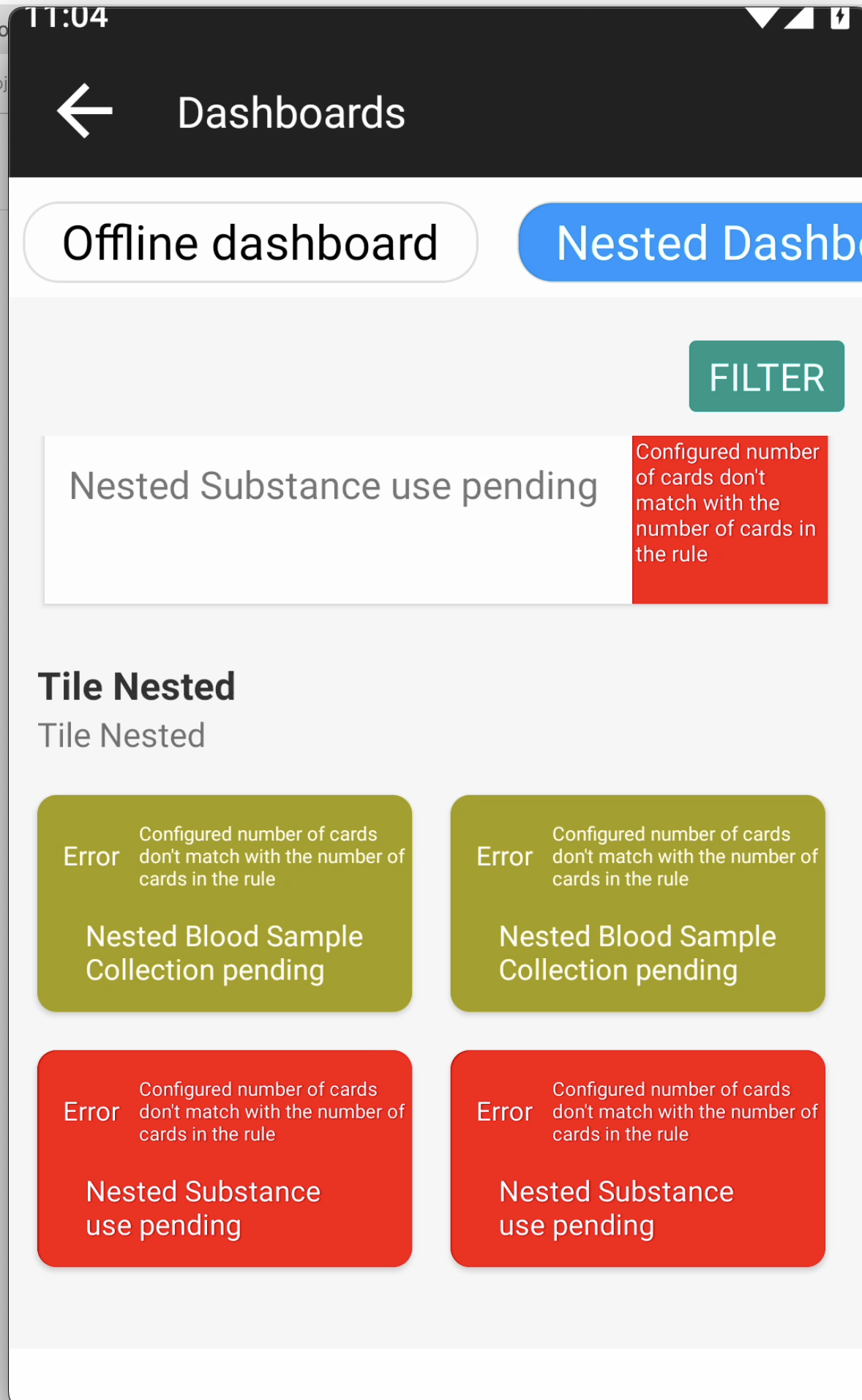
Note: If there is a mismatch between the count of nested report cards configured and the length of reportCards property returned by the query response, then we show an appropriate error message on all Nested Report Cards corresponding to the Custom Report Card.
4. Custom Design Cards
Custom design cards let you define both the data and the UI for a dashboard card. You provide an HTML template and a data rule; the platform evaluates the rule, passes the result into your template, and renders it in a WebView on the mobile app.
How it works
- Data rule — a JavaScript function that queries the device database and returns data
- HTML template — an HTML file that renders the data using
${data.variable}syntax - Translations — key and English value pairs on the card, reachable in the template as
${translations.KEY} - Platform glue — the platform runs your data rule, passes its
dataobject and the resolved translations into your template, and renders the result
Data rule returns:
{
    primaryValue: 10,          ← shown on dashboard tile
    secondaryValue: "(5 new)", ← shown below primaryValue on tile
    name: "My Card",           ← overrides tile name (optional)
    colors: {                  ← overrides tile colours (optional)
        background: "#FFE500",
        text: "#222"
    },
    data: {                    ← becomes 'data' in the HTML template
        total: 10,
        rows: [...]
    }
}

HTML template receives:
    data.total  → 10
    data.rows   → [...]
Return deferredDataFunction instead of data when building the rows is expensive. The platform
calls it only when the card is opened, so the dashboard tile does not pay for it.
{
    primaryValue: 10,
    deferredDataFunction: () => ({ total: 10, rows: buildRows() })
}
data wins when a rule returns both. lineListFunction belongs to Custom Data Cards and is
ignored here — a Custom Design Card whose rule returns only lineListFunction renders with an
empty data object.
Configuration
-
Select Custom Design Card as the card type
-
Data Rule (optional): A JS rule that returns dynamic data for the HTML template. Input/output follows the same pattern as other card rules —
params.dbprovides access to the device database, and dashboard filters are available viaparams.ruleInput. IfprimaryValue/secondaryValueare returned, they show on the card tile. Ifnameorcolorsare returned, they override the tile's name and colours.datais the object handed to the HTML template;deferredDataFunctionis the lazy alternative. Saving without a data rule is allowed (the HTML renders with an emptydataobject). -
HTML File (required): Upload an HTML file defining the custom layout. Saving without an HTML file shows a validation error.
-
Translations (optional): One row per key, each with its English value. Add a row with ADD TRANSLATION. The keys are what the HTML template references as
${translations.KEY}.HTML Template SyntaxThe HTML file is evaluated as a JavaScript template literal. Everything inside
${...}is executed as JavaScript with two variables in scope:dataandtranslations.<!-- Simple value --> <div>${data.total}</div> <!-- Translated label --> <th>${translations.contact_number}</th> <!-- Loop --> ${data.rows.map(row => `<tr><td>${row.name}</td></tr>`).join('')} <!-- Conditional --> ${data.rows.length > 0 ? `<table>...</table>` : `<div>No data</div>`}TranslationsEvery fixed string in the template goes through
translationsso the card follows the field
worker's language setting. That means column headings, section titles and empty-state messages.A key added on the card does nothing on its own. The Translations rows on the card declare
the key and its English value. The template has to reference the key, and the other languages
are filled in on the Translations screen. Three steps, all of them required:- Declare the key on the card. In App Designer → Card, under Translations, add a row:
Translation Keycontact_number, Default (English) ValueContact Number. Save. - Reference it in the HTML. Write
${translations.contact_number}where the text belongs.
Upload the HTML file and save the card. The short form works only for a key made of letters,
digits and underscores that does not start with a digit. Any other key needs the quoted
form:${translations["Total Approved"]},${translations["Amount (Rs)"]}. - Fill in the other languages. Open the Translations screen. Under Download
Translations, pick the platform and press DOWNLOAD. The zip has one JSON file per
language the organisation has enabled, and every key declared on every card is already in
each of them. Put the translated text againstcontact_numberin each language file. Then,
under Upload Translations on the same screen, pick the language, CHOOSE FILE and
UPLOAD, one language at a time.
What the field worker sees. The app resolves each key in this order, and stops at the first
one that has a value:Order Source Set where 1 The organisation's translation for the user's language Translations screen, uploaded file 2 The organisation's English translation Translations screen, en.json3 The English value on the card App Designer, Card, Translations 4 The key itself, printed as-is — Seeing
contact_numberon the screen instead of text means the key reached step 4: it is not
declared on the card and it is not in any uploaded translation file. Check the spelling in the
HTML against the key on the card.
The blank-value trap. A downloaded language file carries every card key with an empty value
against it. An empty value is a value: upload the file with"contact_number": ""still in it
and the card renders a blank where the label should be. It does not fall back to English. Fill
the value in, or delete the key from that language's file before uploading it.
Values that come from the data. A status, an approval state or a coded answer reaches the
template as the English value the data rule returned. Use the value itself as the key:
${translations[row.status]}. Make sure every value the rule can return is a key with a
translation, or that value shows in English.
Text the card's script writes. Everything inside
${...}is filled in once, before the card
opens. A<script>on the card runs later, after the card opens. Text it writes then, such as a
total recalculated when a filter changes or a status label in a table it builds, is not
translated unless the script carries the translations with it. Copy them in one key at a time:<script> // Filled in once, before the card opens: one line per key the script uses. var T = { "Pending": ${JSON.stringify(translations["Pending"])}, "Total Approved": ${JSON.stringify(translations["Total Approved"])} }; function tr(key) { return T[key] || key; } // Later, whenever the script writes text: document.getElementById('summary').textContent = tr("Total Approved") + ': Rs ' + total; cell.textContent = tr(row.status); // a value from the data, used as the key </script>Wrapping each value in
JSON.stringify(...)keeps a translation that contains a quote or a line
break from breaking the script. Add a line to the list for every key the script uses. A key
left out shows in English.Do not copy the whole set with
${JSON.stringify(translations)}. It produces an empty list
{}, so everything the script writes stays English. No error is shown.
Three more things worth knowing.
- Any key the organisation has translated can be used by name, not only the ones declared on the
card.${translations.Male}picks up the organisation's translation of a concept answer. Only a
key asked for by name is looked up this way. - A key can be declared on one card only. Saving a card with a key another card already declares
fails, and the error names the key and the other card. When several cards need the same
label, declare the key once, on any one card, and use it by name on all of them. The other
cards do not need to declare it. - The card's title on the dashboard tile is not translated through this block. The tile
shows the card's name, or thenamethe data rule returns, translated against the
organisation's translations under that exact text. Declaring the card name as a key under
Translations does not reach the tile.
Interactive FilteringFor interactivity (dropdowns, filters), embed the data as JSON in a
<script>tag and use plain JavaScript:<div id="summary">${translations["Total Approved"]}: Rs 0</div> <label>${translations["Month"]}:</label> <select id="month-filter" onchange="filterByMonth()"> <option value="all">${translations["All"]}</option> </select> <table> <thead><tr><th>${translations["Date"]}</th><th>${translations["Status"]}</th></tr></thead> <tbody id="table-body"></tbody> </table> <script> var allRows = ${JSON.stringify(data.rows)}; // The translations this script writes, copied in one key at a time. var T = { "Total Approved": ${JSON.stringify(translations["Total Approved"])}, "No records found": ${JSON.stringify(translations["No records found"])}, "Approved": ${JSON.stringify(translations["Approved"])}, "Pending": ${JSON.stringify(translations["Pending"])}, "Rejected": ${JSON.stringify(translations["Rejected"])} }; function tr(key) { return T[key] || key; } function filterByMonth() { var selected = document.getElementById('month-filter').value; var filtered = selected === 'all' ? allRows : allRows.filter(function(row) { return row.month === selected; }); renderRows(filtered); } function renderRows(rows) { var total = rows .filter(function(row) { return row.status === 'Approved'; }) .reduce(function(sum, row) { return sum + row.amount; }, 0); document.getElementById('summary').textContent = tr("Total Approved") + ': Rs ' + total; var tbody = document.getElementById('table-body'); if (rows.length === 0) { tbody.innerHTML = '<tr><td colspan="2">' + tr("No records found") + '</td></tr>'; return; } tbody.innerHTML = rows.map(function(row) { return '<tr><td>' + row.date + '</td>' + '<td class="status-' + row.status + '">' + tr(row.status) + '</td></tr>'; }).join(''); } renderRows(allRows); </script>The key pattern:
${JSON.stringify(data.rows)}injects the data as a JSON literal at template evaluation time. The<script>then uses it as a regular JavaScript variable for dynamic filtering.The labels outside the script (the month label, "All", the column headings) are filled in before
the card opens, so${translations[...]}is enough for them. The summary line, the empty-table
message and the status labels are written by the script, so they go throughT. The raw status
stays in the class name, so styling that matches onstatus-Approvedkeeps working in every
language.ScrollingVertical scrolling is handled by the platform automatically. Horizontal scrolling is the implementer's responsibility — wrap wide tables in a container with
overflow-x: auto: - Declare the key on the card. In App Designer → Card, under Translations, add a row:
<div style="overflow-x: auto; -webkit-overflow-scrolling: touch;">
    <table><!-- wide table --></table>
</div>
Things to Avoid
- Backticks — the HTML is wrapped in backticks. A stray ``` in your HTML will break evaluation. Use
`for backtick characters. - Backtick strings inside scripts — inside
<script>tags, build strings with+rather than backtick template literals, which clash with the outer template.${...}itself is fine inside a script and is how data and translations reach it:${JSON.stringify(data.rows)},${JSON.stringify(translations["KEY"])}. - Heavy computations in the data rule — the rule runs every time the dashboard loads, once per card. Keep it fast with indexed queries, and move expensive row-building into
deferredDataFunction, which only runs when the card is opened. - Hard-coded English in the template — a string typed straight into the HTML stays English in every language. Put it behind
${translations.KEY}. The same goes for a string the script writes:'Total Approved: Rs ' + totalstays English. Put it behindtr("Total Approved")(see Text the card's script writes).
Complete Example
Data rule:
'use strict';
({params, imports}) => \{
    const _ = imports.lodash;
    const moment = imports.moment;
    const startOfMonth = moment().startOf('month').toDate();

    const subjects = params.db.objects('Individual')
        .filtered('voided = false AND registrationDate >= $0', startOfMonth);

    const rows = _.map(subjects, ind => ({
        date: moment(ind.registrationDate).format('DD.MM.YY'),
        name: ind.name,
        status: 'approved',
    }));

    return {
        primaryValue: rows.length,
        secondaryValue: `(${rows.length} this month)`,
        name: 'Recent Registrations',
        colors: { background: '#FFE500', text: '#222222' },
        data: { total: rows.length, rows: rows },
    };
\}
Translations on the card:
| Translation Key | Default (English) Value |
|---|---|
reg_this_month | registrations this month |
col_date | Date |
col_name | Name |
col_status | Status |
no_reg_this_month | No registrations this month |
approved | Approved |
approved is the status value the data rule returns. It is a key so the template can translate
the value itself.
HTML template:
<style>
    body { font-family: sans-serif; background: #f5f5f5; }
    .summary { background: white; border: 2px solid #333; border-radius: 6px; padding: 14px; text-align: center; margin-bottom: 12px; }
    .summary .value { font-size: 22px; font-weight: 700; }
    table { width: 100%; border-collapse: collapse; border: 2px solid #333; background: white; }
    th { background: #fff3cd; padding: 8px; border: 1px solid #333; font-size: 13px; text-align: left; }
    td { padding: 8px; border: 1px solid #333; font-size: 13px; }
</style>

<div class="summary">
    <div class="value">${data.total} ${translations.reg_this_month}</div>
</div>

${data.rows.length > 0 ? `
<table>
    <thead><tr><th>${translations.col_date}</th><th>${translations.col_name}</th><th>${translations.col_status}</th></tr></thead>
    <tbody>
        ${data.rows.map(row => `
        <tr><td>${row.date}</td><td>${row.name}</td><td>${translations[row.status]}</td></tr>
        `).join('')}
    </tbody>
</table>

` : `<div style="text-align:center;color:#777;padding:20px;">${translations.no_reg_this_month}</div>`}
Bundle Upload
Card configuration is included in the organisation bundle export and import. That covers the action settings (action type, subject type, program, encounter type, visit type, and the Mark-attendance action's attendance type), the custom design card HTML, and the card's translation keys with their English values. All card settings are preserved across bundle upload. No additional configuration is needed after import.
The translated values for the other languages are not stored on the card. They sit in the organisation's translation files, which the bundle carries separately under translations/. A bundle that includes those files brings the card's languages with it; one that does not leaves the card rendering its English values until the receiving organisation's translation files are uploaded.
Default Dashboard and Cards
Starting in release 10.0, any newly created organisation will have a default dashboard created with the following sections, standard cards and filters.
Default Dashboard (Filters: 'Subject Type' and 'As On Date')
- Visit Details Section
- Scheduled Visits Card
- Overdue Visits Card
- Recent Statistics Section
- Recent Registrations Card (Recent duration filter configured as - 1 day)
- Recent Enrolments Card (Recent duration filter configured as - 1 day)
- Recent Visits Card (Recent duration filter configured as - 1 day)
- Registration Overview Section
- Total Card
This default dashboard will also be assigned as Primary dashboard on the 'Everyone' user group.
Reference screen-shots of Avni-Client Custom Dashboard with Approvals ReportCards and Location filter
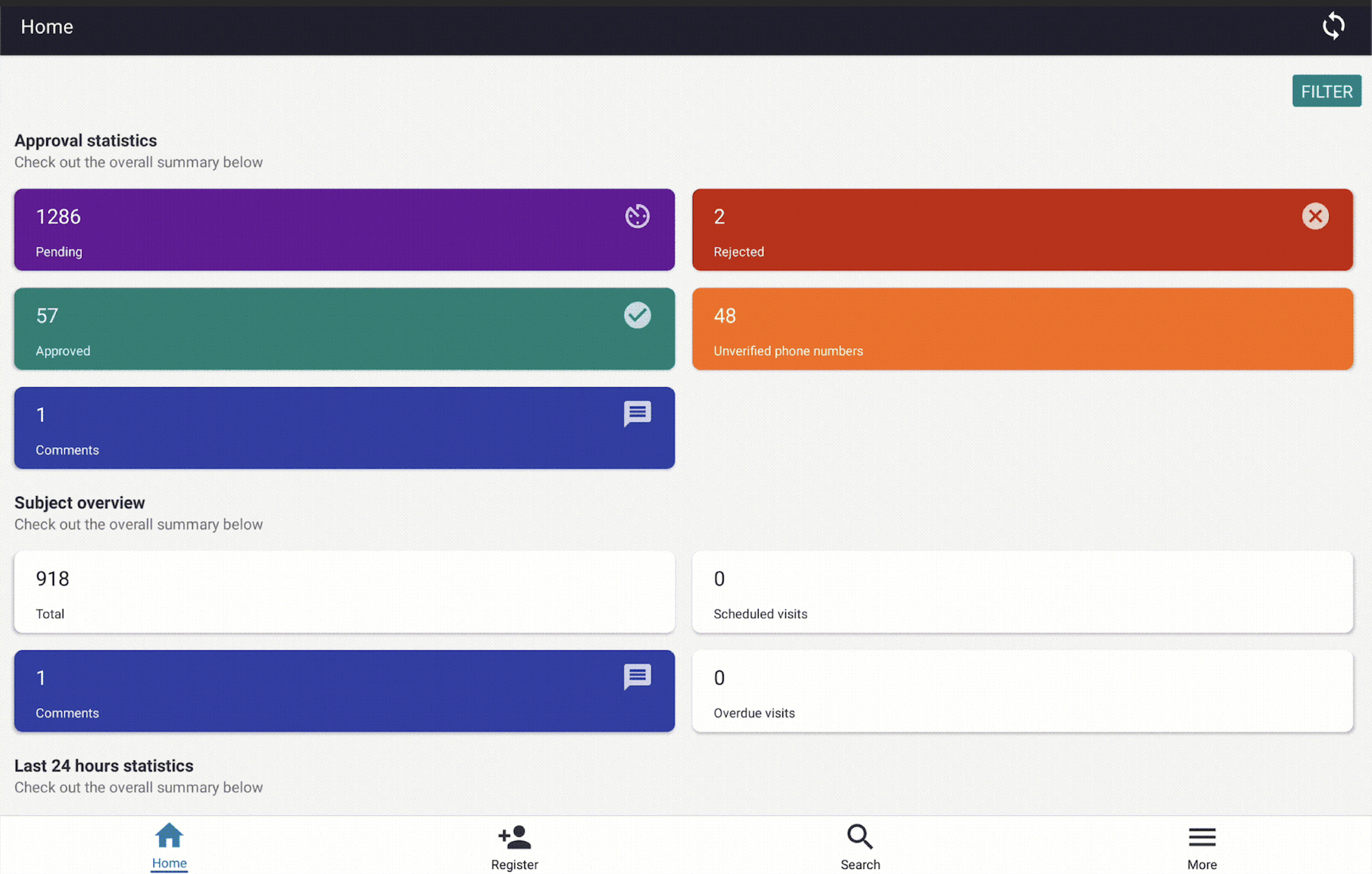
Default state of Approvals Report Cards without any filter applied
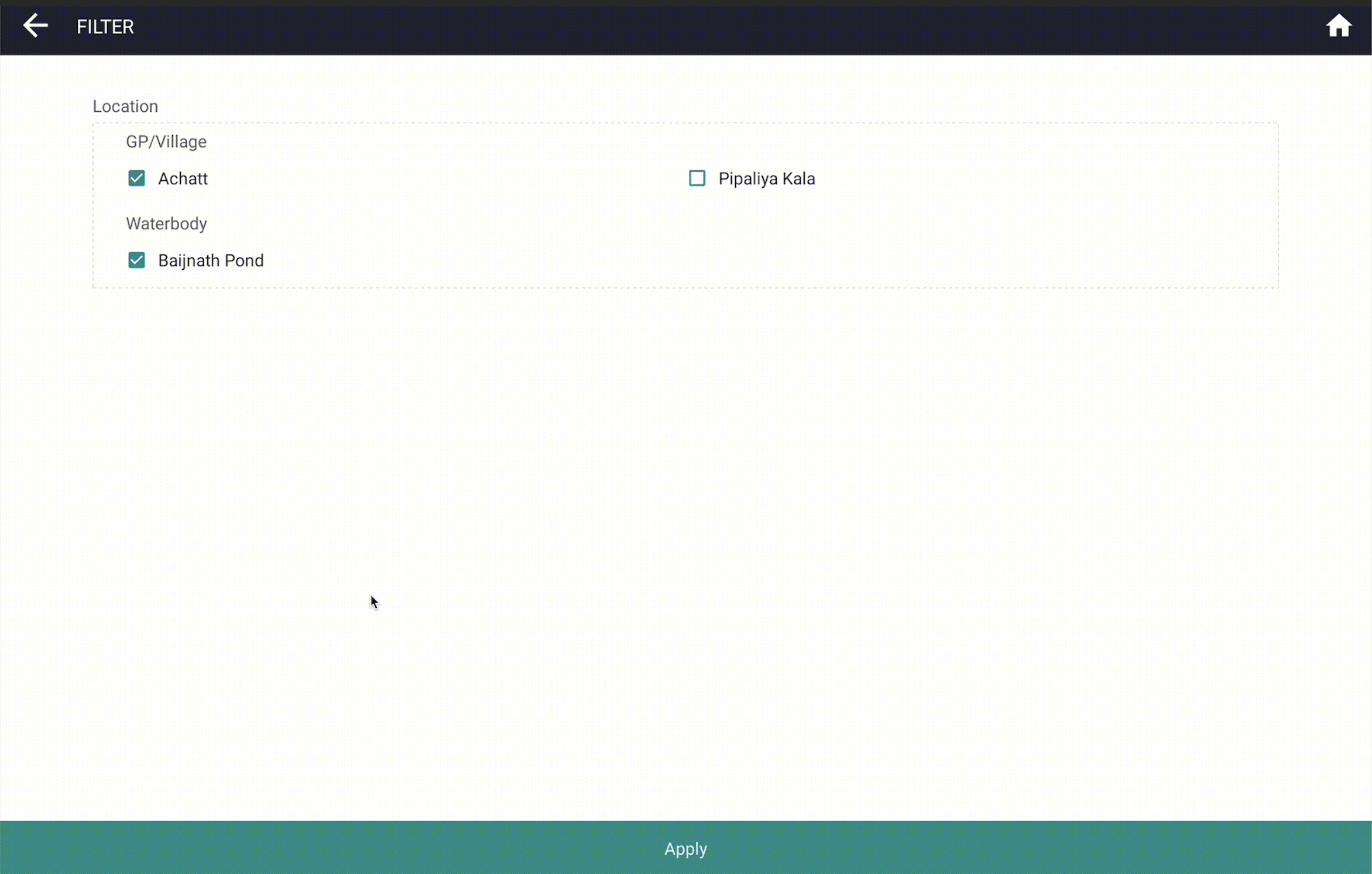
Custom Dashboards filter page
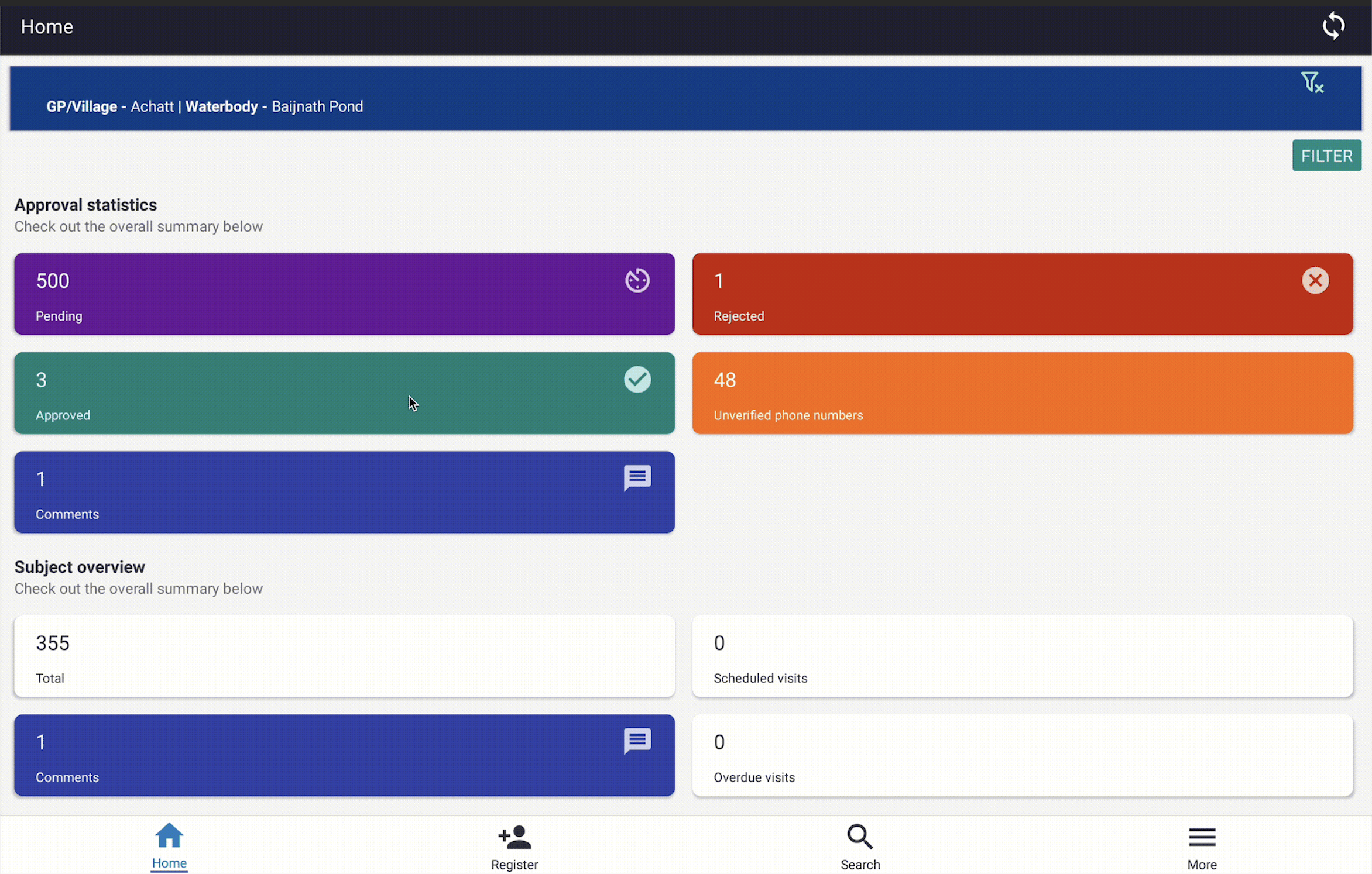
State of Approvals Report Cards after the Location filter was applied
Updated 23 days ago